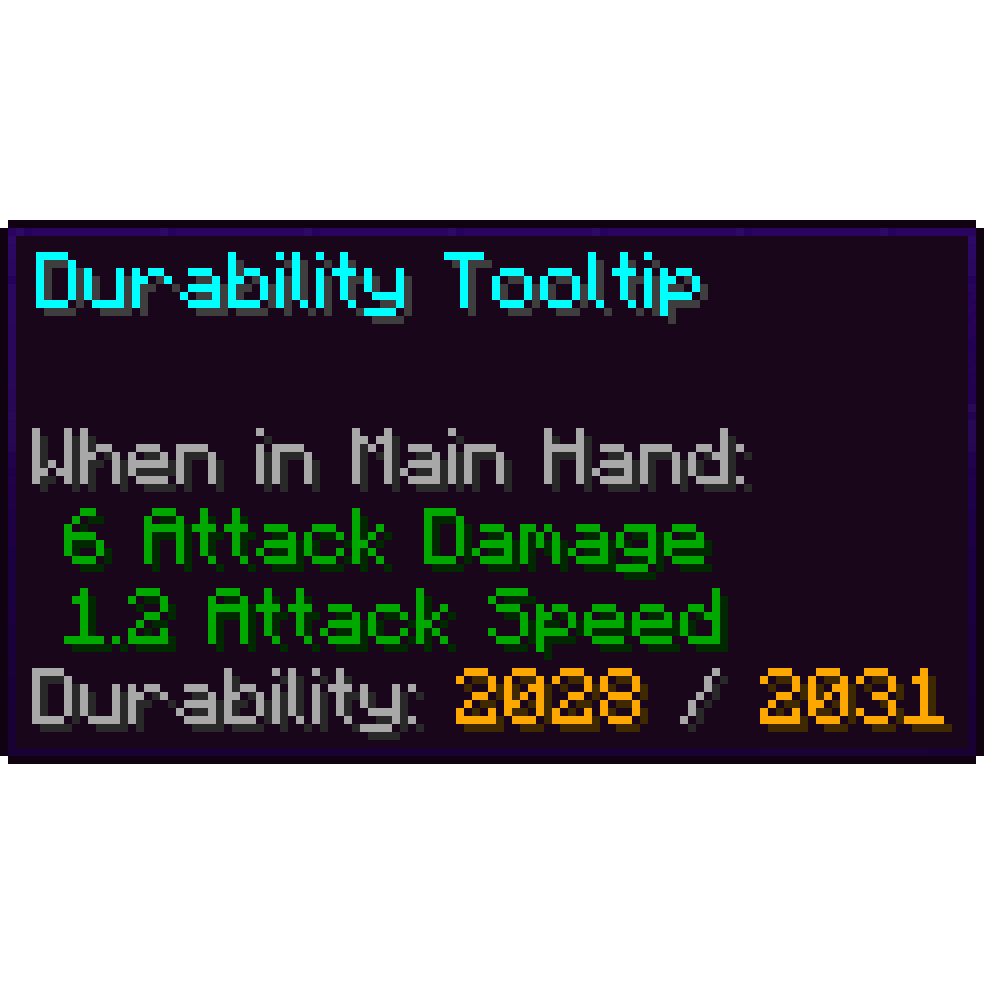
Durability Tooltip in FTB StoneBlock 4
FTB StoneBlock 4 1.23.0 ships version 1.2.0 · First seen in 1.0.0
Durability Tooltip is a mod in FTB StoneBlock 4 1.23.0, where it is version 1.2.0. Durability Tooltip shows you the durability of an item! (Summary from the mod's Modrinth page.)
Durability Tooltip guide for FTB StoneBlock 4
Last verified for FTB StoneBlock 4 v1.23.0 on Oct 17, 2026 · text last changed Oct 17, 2026
Also applies to:FTB Skies 2 1.0.1 to 1.24.0FTB Skies 2: Aero 1.0.3 to 1.10.0Project Infinity 0.1 0.0.45.4 to 0.0.51.4-hotfix-2
- Sections
- 5
2 sections are written for this pack; 3 are shared from another pack's guide.
Every recipe and number here was checked against FTB StoneBlock 4 1.23.0, read from the running game on Oct 13, 2026.
What is Durability Tooltip?
3 parts
Same as in the FTB Skies 2 1.22.0 guide
Durability Tooltip does one simple job: it shows you the durability of an item in its tooltip. Hover over a tool, weapon or piece of armor and you can see how much life it has left, without guessing.[1]
It's a handy quality-of-life mod for everyone, whether you're just starting out or deep into the pack. Nothing here changes how items behave. It only displays information.[1]
Tooltip styles
You can change how the durability is displayed in the mod's config file. The available styles are Numbers, Bar and Text, so pick whichever you find easiest to read.[1]
Version and multiplayer
This pack includes Durability Tooltip 1.1.6, built for NeoForge on Minecraft 1.21.[2]
The mod is only required on the client. It works on servers that don't have it installed, so you can use it on a server even if the server doesn't run it.[1]
Where it fits in progression
Unverified The sources don't show any quests, recipes or progression steps tied to Durability Tooltip in this pack, and it isn't part of the ATM Star path. It works as a background helper that's there from the start.
How do you get started with Durability Tooltip?
2 parts
Same as in the FTB Skies 2: Aero 1.10.0 guide
Good news: Durability Tooltip needs no setup. It shows the durability of items in their tooltip, so you just hover over a tool, weapon or piece of armor in your inventory and the info is there.[1]
It only has to be installed on the client. It also works on servers that don't have it, so it never gets in the way of playing multiplayer.[1]
What the pack gives you out of the box
The pack sets Client.tooltipStyle to NUMBERS. That means a line like 'Durability: 30 / 100'. The other styles are BAR and TEXT.[3]
The numbers are colored by Client.tooltipColorStyle, which is set to VARYING in this pack. That means green, orange or red depending on how much durability is left. The surrounding text uses the base color from Client.baseTooltipColor, which is GRAY here.[3]
- Client.showWhenFull is true, so undamaged tools show the tooltip too.[3]
- Client.showWhenBroken is true. It only matters for mods that let items sit at 0 durability.[3]
- Client.showTooltipHint is true, so the line includes the 'Durability:' label.[3]
- Client.onlyVanillaTools is false, so modded tools get the tooltip as well.[3]
Changing how it looks
To change the style, edit the config file config/durabilitytooltip-common.toml. For tooltipColorStyle the allowed values are BASE, GOLD and VARYING. For tooltipStyle they are BAR, NUMBERS and TEXT.[1][3]
Unverified This guide has no crafting recipes or quest steps to show for Durability Tooltip. The sources here do not show any in the pack, so check the pack's quest book if you want to be sure.
How does Durability Tooltip work?
4 parts
Same as in the FTB Skies 2: Aero 1.10.0 guide
Durability Tooltip shows you the durability of items. There is nothing to build or automate. All of its behaviour comes from a config file, so this section walks through what that file controls and how this pack sets it.[1][3]
The mod is only required on the client, and it works on servers that don't have it installed. That is why all of its options sit under the Client group of the config.[1][3]
Tooltip style
Client.tooltipStyle decides how the durability is drawn. The choices are NUMBERS, TEXT and BAR. This pack leaves it on NUMBERS, which is also the default.[3]
- NUMBERS shows a line like 'Durability: 30 / 100'.[3]
- TEXT shows a word instead of numbers: pristine, slight damaged or nearly broken.[3]
- BAR shows a small bar of filled and empty characters after 'Durability:'.[3]
Colors
Client.baseTooltipColor sets the base text color of the tooltip. It is GRAY in this pack, the same as the default. It accepts the usual Minecraft color names such as RED, GOLD or WHITE, and also formatting codes such as BOLD, ITALIC and UNDERLINE.[3]
Client.tooltipColorStyle controls the reactive part of the tooltip, meaning the numbers, text or bar characters. These are the options:[3]
- BASE uses the base color.[3]
- GOLD is always gold.[3]
- VARYING goes green, orange or red depending on how much durability is left. This is the setting in this pack, and it is the default.[3]
When the tooltip shows
- Client.showWhenFull is true, so you also see the tooltip on tools that are not damaged.[3]
- Client.showWhenBroken is true, so the tooltip stays visible at 0 durability. This only matters for mods that let items sit at 0 durability.[3]
- Client.showTooltipHint is true, so the line includes the 'Durability:' label.[3]
- Client.onlyVanillaTools is false, so the tooltip is not limited to vanilla tools.[3]
Blacklisted mods
Client.blackListedMods is a comma separated list of mods. Items from those mods won't get the durability tooltip. In this pack it holds tconstruct and supplementaries, which matches the mod's default, so the pack has not changed it. If you expect a tooltip on an item from one of those mods and don't see one, this is why.[3]
Which Durability Tooltip config options matter?
3 parts
Good news: each option listed below is set to the mod's default in this pack, so you get the stock look. They all live in the Client section of the config file. The mod is also only required on the client, so it works with servers that don't have it installed.[1][4]
How the tooltip looks
- Client.tooltipStyle is NUMBERS, which gives you a readout like 'Durability: 30 / 100'. You can switch it to TEXT (pristine, slightly damaged, nearly broken) or BAR (a row of block characters).[4]
- Client.tooltipColorStyle is VARYING, so the numbers, text or bar change between green, orange and red depending on remaining durability. BASE uses the base color instead, and GOLD is always gold.[4]
- Client.baseTooltipColor is GRAY. It sets the base text color of the tooltip.[4]
- Client.showTooltipHint is true, so the tooltip includes the 'Durability:' hint.[4]
When the tooltip shows up
- Client.showWhenFull is true, so tools that are not damaged still show their durability. Turn it off if you only want the tooltip on damaged tools.[4]
- Client.showWhenBroken is true. It only matters for mods that allow items to sit at 0 durability.[4]
- Client.onlyVanillaTools is false, so the tooltip is not limited to vanilla tools. Set it to true if you only want it on vanilla tools.[4]
Blacklisted mods
Client.blackListedMods is set to 'tconstruct,supplementaries'. Items from those mods won't show the durability tooltip, and this matches the mod's default. The list allows a length of 0 to 100, so you can add more mods to it if you like.[4]
What changed in Durability Tooltip between versions?
FTB StoneBlock 4 1.21.0 ships with Durability Tooltip 1.2.0, the newest release covered here. The mod was already in the pack as of 1.0.0 or earlier, so you've had it from the start. Here's what changed across the releases that matter for this version.[5]
- 1.2.0: Items with a durability of 0 now show that properly, which helps with mods that allow broken tools. There's a new config option to hide the tooltip when durability is 0. In 'text' mode, an item at durability 0 reads "Broken". Ukrainian translations were added too.[6]
- 1.1.6: A translation update. Argentinian Spanish, European Portuguese, Japanese, Polish, Turkish and Traditional Chinese were added, and the Russian translations were updated.[6][7]
- 1.1.5: The initial release of Durability Tooltip for Minecraft 1.21.[6][7]
The 1.2.0 change is the one you'll notice in play. A tool at 0 durability now shows its state clearly instead of an odd or missing readout, and you can switch that tooltip off in the config if you'd rather not see it.[6]
Sources
- Durability Tooltip project page (modrinth) · official mod data
- FTB Skies 2 1.22.0 mod list · pack file
- FTB Skies 2: Aero 1.10.0 config: config/durabilitytooltip-common.toml · pack file
- FTB StoneBlock 4 1.21.0 config: config/durabilitytooltip-common.toml · pack file
- FTB StoneBlock 4 1.21.0 mod list · pack file
- Durability Tooltip 1.2.0 changelog · changelog
- Durability Tooltip 1.1.6 changelog · changelog
Where this guide comes from
Written from what FTB StoneBlock 4 itself ships: its files and recipes, the in-game guidebooks and the mods' own pages. Every statement links to the source it came from, and the numbers are checked against the pack before publishing.
Guide last verified Oct 17, 2026.
Report wrong info
Version in each release
48 releases, first in 1.0.0
| FTB StoneBlock 4 | Version | Jar | Where it came from |
|---|---|---|---|
| 1.23.0 Oct 12, 2026 | 1.2.0 | durabilitytooltip-1.2.0-neoforge-mc1.21.jar | From the published release |
| 1.22.0 Sep 22, 2026 | 1.2.0 | durabilitytooltip-1.2.0-neoforge-mc1.21.jar | From the published release |
| 1.21.0 Sep 9, 2026 | 1.2.0 | durabilitytooltip-1.2.0-neoforge-mc1.21.jar | From the published release |
| 1.20.1 Sep 1, 2026 | 1.1.6 | durabilitytooltip-1.1.6-neoforge-mc1.21.jar | From the published release |
| 1.20.0 Aug 26, 2026 | 1.1.6 | durabilitytooltip-1.1.6-neoforge-mc1.21.jar | From the published release |
| 1.19.1 Aug 12, 2026 | 1.1.6 | durabilitytooltip-1.1.6-neoforge-mc1.21.jar | From the published release |
| 1.19.0 Aug 11, 2026 | 1.1.6 | durabilitytooltip-1.1.6-neoforge-mc1.21.jar | From the published release |
| 1.18.0 Aug 9, 2026 | 1.1.6 | durabilitytooltip-1.1.6-neoforge-mc1.21.jar | From the published release |
| 1.17.2 Jul 29, 2026 | 1.1.6 | durabilitytooltip-1.1.6-neoforge-mc1.21.jar | From the published release |
| 1.17.1 Jul 28, 2026 | 1.1.6 | durabilitytooltip-1.1.6-neoforge-mc1.21.jar | From the published release |
| 1.17.0 Jul 24, 2026 | 1.1.6 | durabilitytooltip-1.1.6-neoforge-mc1.21.jar | From the published release |
| 1.16.0 Jul 2, 2026 | 1.1.6 | durabilitytooltip-1.1.6-neoforge-mc1.21.jar | From the published release |
| 1.15.3 Jun 17, 2026 | 1.1.6 | durabilitytooltip-1.1.6-neoforge-mc1.21.jar | From the published release |
| 1.15.2 Jun 16, 2026 | 1.1.6 | durabilitytooltip-1.1.6-neoforge-mc1.21.jar | From the published release |
| 1.15.0 Jun 13, 2026 | 1.1.6 | durabilitytooltip-1.1.6-neoforge-mc1.21.jar | From the published release |
| 1.14.2 Jun 3, 2026 | 1.1.6 | durabilitytooltip-1.1.6-neoforge-mc1.21.jar | From the published release |
| 1.14.1 May 31, 2026 | 1.1.6 | durabilitytooltip-1.1.6-neoforge-mc1.21.jar | From the published release |
| 1.14.0 May 27, 2026 | 1.1.6 | durabilitytooltip-1.1.6-neoforge-mc1.21.jar | From the published release |
| 1.13.1 May 12, 2026 | 1.1.6 | durabilitytooltip-1.1.6-neoforge-mc1.21.jar | From the published release |
| 1.13.0 May 12, 2026 | 1.1.6 | durabilitytooltip-1.1.6-neoforge-mc1.21.jar | From the published release |
| 1.12.0 May 7, 2026 | 1.1.6 | durabilitytooltip-1.1.6-neoforge-mc1.21.jar | From the published release |
| 1.11.1 Apr 24, 2026 | 1.1.6 | durabilitytooltip-1.1.6-neoforge-mc1.21.jar | From the published release |
| 1.11.0 Apr 16, 2026 | 1.1.6 | durabilitytooltip-1.1.6-neoforge-mc1.21.jar | From the published release |
| 1.10.0 Apr 8, 2026 | 1.1.6 | durabilitytooltip-1.1.6-neoforge-mc1.21.jar | From the published release |
| 1.9.6 Apr 3, 2026 | 1.1.6 | durabilitytooltip-1.1.6-neoforge-mc1.21.jar | From the published release |
| 1.9.5 Apr 1, 2026 | 1.1.6 | durabilitytooltip-1.1.6-neoforge-mc1.21.jar | From the published release |
| 1.9.4 Mar 25, 2026 | 1.1.6 | durabilitytooltip-1.1.6-neoforge-mc1.21.jar | From the published release |
| 1.9.3 Mar 23, 2026 | 1.1.6 | durabilitytooltip-1.1.6-neoforge-mc1.21.jar | From the published release |
| 1.9.1 Mar 19, 2026 | 1.1.6 | durabilitytooltip-1.1.6-neoforge-mc1.21.jar | From the published release |
| 1.9.0 Mar 17, 2026 | 1.1.6 | durabilitytooltip-1.1.6-neoforge-mc1.21.jar | From the published release |
| 1.8.1 Mar 11, 2026 | 1.1.6 | durabilitytooltip-1.1.6-neoforge-mc1.21.jar | From the published release |
| 1.8.0 Feb 10, 2026 | 1.1.6 | durabilitytooltip-1.1.6-neoforge-mc1.21.jar | From the published release |
| 1.7.3 Feb 3, 2026 | 1.1.6 | durabilitytooltip-1.1.6-neoforge-mc1.21.jar | From the published release |
| 1.7.2 Feb 3, 2026 | 1.1.6 | durabilitytooltip-1.1.6-neoforge-mc1.21.jar | From the published release |
| 1.7.0 Jan 30, 2026 | 1.1.6 | durabilitytooltip-1.1.6-neoforge-mc1.21.jar | From the published release |
| 1.6.0 Jan 7, 2026 | 1.1.6 | durabilitytooltip-1.1.6-neoforge-mc1.21.jar | From the published release |
| 1.5.0 Dec 16, 2025 | 1.1.6 | durabilitytooltip-1.1.6-neoforge-mc1.21.jar | From the published release |
| 1.4.0 Dec 9, 2025 | 1.1.6 | durabilitytooltip-1.1.6-neoforge-mc1.21.jar | From the published release |
| 1.3.0 Dec 4, 2025 | 1.1.6 | durabilitytooltip-1.1.6-neoforge-mc1.21.jar | From the published release |
| 1.2.1 Nov 26, 2025 | 1.1.6 | durabilitytooltip-1.1.6-neoforge-mc1.21.jar | From the published release |
| 1.2.0 Nov 25, 2025 | 1.1.6 | durabilitytooltip-1.1.6-neoforge-mc1.21.jar | From the published release |
| 1.1.2 Nov 18, 2025 | 1.1.6 | durabilitytooltip-1.1.6-neoforge-mc1.21.jar | From the published release |
| 1.1.1 Nov 17, 2025 | 1.1.6 | durabilitytooltip-1.1.6-neoforge-mc1.21.jar | From the published release |
| 1.0.8 Nov 6, 2025 | 1.1.6 | durabilitytooltip-1.1.6-neoforge-mc1.21.jar | From the published release |
| 1.0.7 Nov 4, 2025 | 1.1.6 | durabilitytooltip-1.1.6-neoforge-mc1.21.jar | From the published release |
| 1.0.3 Nov 1, 2025 | 1.1.6 | durabilitytooltip-1.1.6-neoforge-mc1.21.jar | From the published release |
| 1.0.1 Oct 30, 2025 | 1.1.6 | durabilitytooltip-1.1.6-neoforge-mc1.21.jar | From the published release |
| 1.0.0 Oct 29, 2025 | 1.1.6 | durabilitytooltip-1.1.6-neoforge-mc1.21.jar | From the published release |
"From pack files" means the list came from the pack's own files; "from the published release" means ForgeBase read the jars of the release itself.
Items and blocks
We can't match this mod to the pack's item list: it registers as durabilitytooltip, and the pack's recipe dump has nothing under that name. That means we found nothing, not that the mod adds nothing. Search the item browser
Config options (how FTB StoneBlock 4 sets them)
8 settings this pack ships for the mod. We don't have the mod's own defaults to compare them against yet.
Show settings
| Setting | FTB StoneBlock 4 value |
|---|---|
Client.baseTooltipColor What should be the base text color of the tooltip? config/durabilitytooltip-common.toml | GRAY |
Client.blackListedMods Which mods should be blacklisted? Items from blacklisted mods won't show the durability tooltip. Allowed length: 0 ~ 100 - Default: 'tconstruct,supplementaries' config/durabilitytooltip-common.toml | tconstruct,supplementaries |
Client.onlyVanillaTools Should the durability tooltip only be shown on vanilla tools? config/durabilitytooltip-common.toml | false |
Client.showTooltipHint Should the tooltip include the 'Durability:' hint? config/durabilitytooltip-common.toml | true |
Client.showWhenBroken Should the durability tooltip be shown when a tool is broken, i.e. 0 durability? Only relevant for mods that allow items to have 0 durability. config/durabilitytooltip-common.toml | true |
Client.showWhenFull Should the durability tooltip be shown when a tool is not damaged? config/durabilitytooltip-common.toml | true |
Comments and tips
Loading comments...