Tool Belt in FTB Skies 2: Aero
FTB Skies 2: Aero 1.13.0 ships version 2.2.10 · First seen in 1.0.3
Tool Belt is a mod in FTB Skies 2: Aero 1.13.0, where it is version 2.2.10. A utility belt that holds your tools (Summary from the mod's Modrinth page.)
Tool Belt guide for FTB Skies 2: Aero
Last verified for FTB Skies 2: Aero v1.10.0 on Oct 15, 2026 · text last changed Oct 15, 2026
This is the newest guide. It hasn't been checked against 1.13.0 yet.
Also applies to:FTB Skies 2 1.0.1 to 1.24.0
- Sections
- 6
- Recipes shown
- 2
- Items named
- 3
- Quests covered
- 5
5 sections are written for this pack; 1 is shared from another pack's guide.
Every recipe and number here was checked against FTB Skies 2: Aero 1.10.0, read from the running game on Sep 22, 2026.
What is Tool Belt?
1 part
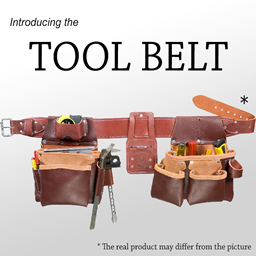
The Tool Belt is the perfect place to keep all of your tools in one spot. Hold down R to bring up a radial menu and pick whatever you need from the tools stored inside.[1]
You can upgrade the belt with Belt Pouches in an Anvil, up to 9 total slots.[1]
In this pack
The pack includes Tool Belt 2.2.10, and it has been in the pack since version 1.0.3 or earlier.[2]
The quest book covers it with the quest "Tool Belt" quest. It sits in the "Useful Items & Tips" chapter, which is chapter 2 of 31 in the book and holds 30 quests. The quest's task is to have the belt item.[1]
The chapter's intro quest, "Tips & Tricks!" quest, says you will find plenty of useful items and tips in the chapter to use in your playthrough. Other quests in the same chapter include "Simple Magnets" quest and "All-In-One Tools" quest.[1]
How do you get started with Tool Belt?
3 parts
The first thing to make with this mod is the Tool Belt. The pack's quest book gives it its own quest, "Tool Belt" quest, in the chapter "Useful Items & Tips". The quest describes the belt as the place to store all of your tools in one spot.[1]
Step by step
- Craft the Tool Belt. The recipe is just below.[3]
- Craft one or more Belt Pouch items. These are the upgrades for your belt.[1][3]
- Combine the belt with Belt Pouches in an Anvil to add slots. The belt can reach 9 slots in total.[1]
- Hold R to bring up the radial menu and pick any tool stored in the belt.[1]
Crafting Shaped
| Empty slot | ||
Recipe id: toolbelt:belt
This is the belt itself, so make it first.
Crafting Shaped
| Empty slot | ||
Recipe id: toolbelt:pouch
Each pouch is an upgrade you apply to the belt in an Anvil, up to 9 slots in total.
Check your belt's tooltip: it shows which upgrades it has and how many slots that gives you.[4]
Keybinds
The mod adds its own keybinds under a Tool Belt category in your controls: Swap Tool, Cycle Tool Left, Cycle Tool Right and Open Belt Slot Inventory. Check them there if you want to change how you use the belt.[4]
What can go in the belt
In this pack, general.allowAllNonStackableItems is true, so non-stackable items are allowed by default. The general.blacklist contains only the Sophisticated Backpacks backpack, so you can't put one of those in your belt. The general.whitelist is empty.[5]
How does Tool Belt work?
4 parts
Tool Belt adds two items: the Tool Belt and the Belt Pouch. There is no guidebook for it in the sources, so this section covers what the language file, the pack's configs and its recipe dump show.[3][4]
Controls
The mod registers its own key bindings under a Tool Belt category: Swap Tool, Cycle Tool Left, Cycle Tool Right and Open Belt Slot Inventory. Check your controls menu to see what they are bound to, since the sources don't give default keys.[4]
The belt's tooltip shows its upgrades and how many slots they give it, so hover over it to see where yours stands.[4]
Crafting
In this pack both items have a shaped crafting recipe from the mod itself. Here is the belt:[3]
And here is the pouch:[3]
Crafting Shaped
| Empty slot | ||
Recipe id: toolbelt:pouch
The mod can switch to sewing recipes when the Sewing Kit mod is present. With general.enableGridCraftingRecipes on AUTO, the grid recipes for the belt and pouch are disabled if Sewing Kit is present. The pack also leaves general.enableSewingKitSupport on true, so sewing recipe support is not switched off.[6]
general.anvilUpgrading is set to AUTO. In that mode the crafting and upgrade recipes use the Sewing mechanics if Sewing Kit is present. OFF disables anvil upgrading regardless.[6]
The belt slot
The pack sets general.customBeltSlotMode to ON, so the mod's own belt slot is enabled. On AUTO it would be disabled if Curios is present, and OFF disables it permanently.[6]
What can go in the belt
The server config decides which items the belt accepts. This is how the pack sets it.[5]
- general.allowAllNonStackableItems is true. The config notes that setting it to false means stackable items are no longer allowed by default.[5]
- general.blacklist contains Backpack, so that backpack is disallowed in the belt.[5]
- general.whitelist is empty in this pack. Anything on the whitelist is force-allowed and takes precedence over the blacklist.[5]
How do you progress through Tool Belt?
3 parts
Tool Belt has a very short progression path in this pack. There is one belt and one upgrade item, so you won't be climbing through material tiers like you would with a tool set. You craft the Tool Belt, then grow it with Belt Pouch items.[1][3]
Where it sits in the quest book
The quest "Tool Belt" quest is in the "Useful Items & Tips" chapter, which is chapter 2 of 31 in the book and holds 30 quests. The quest task is to get the Tool Belt.[1]
Step 1: the Tool Belt
The belt stores your tools in one place. Hold R to bring up a radial menu and pick whatever is inside. Here is the in-pack recipe:[1][3]
Step 2: upgrade with Belt Pouches
Belt Pouches are the upgrade path. You apply them to the belt in an Anvil, and the belt can reach up to 9 total slots.[1]
Crafting Shaped
| Empty slot | ||
Recipe id: toolbelt:pouch
Both recipes are listed as regular mod recipes, so nothing in the pack's recipe data shows them being changed.[3]
Unverified How many slots the belt starts with, and how many slots each Belt Pouch adds, are not confirmed by the pack's quest text or recipe data.
Which FTB Skies 2: Aero quests use Tool Belt?
2 parts
The Tool Belt has one quest in the pack, and it sits in the chapter "Useful Items & Tips". That is chapter 2 of 31 in the quest book, and it holds 30 quests. The chapter's own intro quest, "Tips & Tricks!" quest, says it is where you'll find plenty of useful items and tips for your playthrough.[1]
The Tool Belt quest
"Tool Belt" quest has a single task: obtain the Tool Belt. The quest text describes it as the place to store all of your tools in one spot.[1]
- Hold down R to bring up a radial menu and quickly reach anything stored in the belt.[1]
- Upgrade the belt with Belt Pouches in an Anvil, up to 9 total slots.[1]
The quest book doesn't list any prerequisite for this quest, so I can't tell you what comes right before or after it in the chapter.[1]
Other quests in the same chapter
If you like the idea of keeping your inventory tidy, a few neighbours in this chapter are worth a look. "Simple Magnets" quest covers magnets that pull nearby items into your inventory. "All-In-One Tools" quest covers All-In-One Tools, so you switch tools less often. "Inventory Trashcan!" quest explains the inventory trash slot.[1]
Which Tool Belt config options matter?
3 parts
Same as in the FTB Skies 2 1.22.0 guide
Tool Belt splits its settings across a client, a common and a server config file. Here is how this pack sets the options you are most likely to touch. The only value the sources compare with a mod default is display.beltItemScale, and the pack leaves it at the default.[7][8][9]
Client options: how the belt looks and the radial menu feels
- display.beltItemScale is 0.5 in this pack, the same as the mod default. It changes the scale of items on the belt and accepts values from 0.1 to 2.0.[7]
- display.showBeltOnPlayers is true. If you set it to false, belts and tools are no longer drawn on players.[7]
- menu.releaseToSwap is false, so you need a click to confirm a swap. Set it to true and releasing the menu key (R) activates the swap instead.[7]
- menu.displayEmptySlots is false. Set it to true and the radial menu always shows every slot, even empty ones, and lets you pick which empty slot to insert into.[7]
- menu.clipMouseToCircle is false. Set it to true and the menu tries to keep your mouse inside the outer circle.[7]
- menu.allowClickOutsideBounds is false. Set it to true and you can click outside the outer circle to activate items.[7]
Common options: belt slot, crafting and upgrades
- general.customBeltSlotMode is ON. The allowed values are OFF, AUTO and ON. AUTO disables the belt slot if Curios is present, and OFF disables it permanently.[8]
- general.enableSewingKitSupport is true. Setting it to false turns off support for sewing recipes regardless of the Sewing Kit mod's presence.[8]
- general.enableGridCraftingRecipes is AUTO. With AUTO, the belt and pouch crafting recipes are disabled if the Sewing Kit mod is present, and sewing recipes are used instead.[8]
- general.anvilUpgrading is AUTO. With AUTO, the crafting and upgrade recipes use the Sewing mechanics if the Sewing Kit mod is present. OFF disables anvil upgrading regardless.[8]
Server options: what can go on the belt
- general.blacklist contains Backpack, so that item is not allowed in the belt. The whitelist takes precedence over the blacklist.[9]
- general.whitelist is empty, so nothing is force-allowed. Anything you add there overrides the blacklist.[9]
- general.allowAllNonStackableItems is true. If you set it to false, stackable items are no longer allowed by default.[9]
Sources
- FTB Skies 2: Aero 1.10.0 quests: "Useful Items & Tips" · pack file
- FTB Skies 2: Aero 1.10.0 mod list · pack file
- FTB Skies 2: Aero 1.10.0 recipe dump: recipes making Tool Belt items · pack recipe dump
- toolbelt names, screen text and descriptions (English lang file) · official mod data
- FTB Skies 2: Aero 1.10.0 config: config/toolbelt-server.toml · pack file
- FTB Skies 2: Aero 1.10.0 config: config/toolbelt-common.toml · pack file
- FTB Skies 2 1.22.0 config: config/toolbelt-client.toml · pack file
- FTB Skies 2 1.22.0 config: config/toolbelt-common.toml · pack file
- FTB Skies 2 1.22.0 config: config/toolbelt-server.toml · pack file
Where this guide comes from
Written from what FTB Skies 2: Aero itself ships: its files and recipes, the in-game guidebooks and the mods' own pages. Every statement links to the source it came from, and the numbers are checked against the pack before publishing.
Guide last verified Oct 15, 2026.
Report wrong info
Version in each release
21 releases, first in 1.0.3
| FTB Skies 2: Aero | Version | Jar | Where it came from |
|---|---|---|---|
| 1.13.0 Sep 28, 2026 | 2.2.10 | ToolBelt-1.21.1-2.2.10.jar | From the published release |
| 1.12.1 Sep 22, 2026 | 2.2.10 | ToolBelt-1.21.1-2.2.10.jar | From the published release |
| 1.12.0 Sep 21, 2026 | 2.2.10 | ToolBelt-1.21.1-2.2.10.jar | From the published release |
| 1.10.0 Sep 8, 2026 | 2.2.10 | ToolBelt-1.21.1-2.2.10.jar | From the published release |
| 1.9.1 Sep 2, 2026 | 2.2.10 | ToolBelt-1.21.1-2.2.10.jar | From the published release |
| 1.9.0 Sep 1, 2026 | 2.2.10 | ToolBelt-1.21.1-2.2.10.jar | From the published release |
| 1.8.0 Aug 25, 2026 | 2.2.10 | ToolBelt-1.21.1-2.2.10.jar | From the published release |
| 1.7.3 Aug 19, 2026 | 2.2.10 | ToolBelt-1.21.1-2.2.10.jar | From the published release |
| 1.7.2 Aug 18, 2026 | 2.2.10 | ToolBelt-1.21.1-2.2.10.jar | From the published release |
| 1.7.1 Aug 18, 2026 | 2.2.10 | ToolBelt-1.21.1-2.2.10.jar | From the published release |
| 1.6.1 Aug 13, 2026 | 2.2.10 | ToolBelt-1.21.1-2.2.10.jar | From the published release |
| 1.6.0 Aug 11, 2026 | 2.2.10 | ToolBelt-1.21.1-2.2.10.jar | From the published release |
| 1.5.1 Aug 8, 2026 | 2.2.10 | ToolBelt-1.21.1-2.2.10.jar | From the published release |
| 1.4.1 Aug 4, 2026 | 2.2.10 | ToolBelt-1.21.1-2.2.10.jar | From the published release |
| 1.4.0 Aug 3, 2026 | 2.2.10 | ToolBelt-1.21.1-2.2.10.jar | From the published release |
| 1.3.0 Jul 30, 2026 | 2.2.10 | ToolBelt-1.21.1-2.2.10.jar | From the published release |
| 1.2.1 Jul 28, 2026 | 2.2.10 | ToolBelt-1.21.1-2.2.10.jar | From the published release |
| 1.2.0 Jul 28, 2026 | 2.2.10 | ToolBelt-1.21.1-2.2.10.jar | From the published release |
| 1.1.1 Jul 25, 2026 | 2.2.10 | ToolBelt-1.21.1-2.2.10.jar | From the published release |
| 1.1.0 Jul 24, 2026 | 2.2.10 | ToolBelt-1.21.1-2.2.10.jar | From the published release |
| 1.0.3 Jul 17, 2026 | 2.2.10 | ToolBelt-1.21.1-2.2.10.jar | From the published release |
"From pack files" means the list came from the pack's own files; "from the published release" means ForgeBase read the jars of the release itself.
Items and blocks
2 items from the 1.10.0 recipe dump.
FTB Skies 2: Aero quests (1)
Quests from the pack's FTB Quests book that ask for this mod's items.
Useful Items & Tips (1)
- Tool Belt
Config options (how FTB Skies 2: Aero sets them)
13 settings shipped in the pack's config files; 0 differ from the mod's documented default.
Show settings
| Setting | FTB Skies 2: Aero value | Mod default |
|---|---|---|
display.showBeltOnPlayers If set to FALSE, the belts and tools will NOT draw on players. config/toolbelt-client.toml | true | not documented |
menu.allowClickOutsideBounds If set to TRUE, the radial menu will allow clicking outside the outer circle to activate the items. config/toolbelt-client.toml | false | not documented |
menu.clipMouseToCircle If set to TRUE, the radial menu will try to prevent the mouse from leaving the outer circle. config/toolbelt-client.toml | false | not documented |
menu.displayEmptySlots If set to TRUE, the radial menu will always display all the slots, even when empty, and will allow choosing which empty slot to insert into. config/toolbelt-client.toml | false | not documented |
menu.releaseToSwap If set to TRUE, releasing the menu key (R) will activate the swap. Requires a click otherwise (default). config/toolbelt-client.toml | false | not documented |
general.anvilUpgrading If AUTO, the crafting and upgrade recipes will use the Sewing mechanics if the Sewing Kit mod is present. Off disables anvil upgrading regardless. config/toolbelt-common.toml | AUTO | not documented |
Comments and tips
Loading comments...