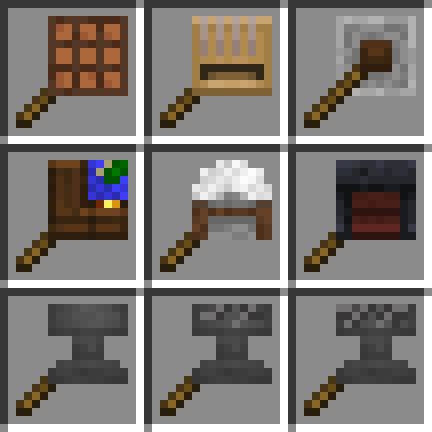
Crafting on a Stick in FTB Evolution 2
FTB Evolution 2 1.4.0 ships version 26.1-1.1 · First seen in 1.0.2
Crafting on a Stick is a mod in FTB Evolution 2 1.4.0, where it is version 26.1-1.1. Adds multiple crafting station on a stick such as crafting table on a stick (Summary from the mod's Modrinth page.)
Crafting on a Stick guide for FTB Evolution 2
Last verified for FTB Evolution 2 v1.4.0 on Oct 17, 2026 · text last changed Oct 13, 2026
Also applies to:All the Mods 11 0.10.0-beta to 0.12.0-beta
- Sections
- 6
- Recipes shown
- 9
- Items named
- 9
5 sections are written for this pack; 1 is shared from another pack's guide.
Every recipe and number here was checked against FTB Evolution 2 1.4.0, read from the running game on Oct 17, 2026.
What is Crafting on a Stick?
3 parts
Same as in the All the Mods 11 0.10.0-beta guide
Crafting on a Stick lets you use crafting stations without placing them in the world. Each station comes as a "on a stick" item, and you use the item in hand to open the workbench.[1]
Stations you get
The mod adds a stick version of each of these workbenches:[1]
- Crafting Table[1]
- Anvil[1]
- Loom[1]
- Grindstone[1]
- Cartography Table[1]
- Stonecutter[1]
- Smithing Table[1]
Curios support
The mod is compatible with Curios. Put your favorite workbench on a stick in the designated curios slot and press the keybind to open it. The default key is V.[1]
In this pack
This pack ships Crafting on a Stick 26.1-1.1 (the NeoForge build). It has been part of the pack since version 0.0.1 or earlier.[2]
How do you get started with Crafting on a Stick?
3 parts
Crafting on a Stick lets you use workbenches straight from your hand, so you never have to place a crafting table on the ground. Each station is its own item, and you open it by using the item in hand. That makes it a great early upgrade for your inventory.[1]
Step 1: the crafting table on a stick
Start with Crafting Table. It gives you a crafting grid anywhere, and every other station builds on the same idea. The in-pack recipe is below.[1][3]
Crafting Shaped
| Empty slot | Crafting Table |
| Stick | Empty slot |
Recipe id: crafting_on_a_stick:crafting_table
This is the recipe as the pack ships it.
Step 2: the other stations
The mod also adds an anvil, a loom, a grindstone, a cartography table, a stonecutter and a smithing table, each on a stick. Make the ones you actually use, and open them by using the item in hand.[1]
Crafting Shaped
| Empty slot | Anvil |
| Stick | Empty slot |
Recipe id: crafting_on_a_stick:anvil
Crafting Shaped
| Empty slot | Grindstone |
| Stick | Empty slot |
Recipe id: crafting_on_a_stick:grindstone
Crafting Shaped
| Empty slot | Smithing Table |
| Stick | Empty slot |
Recipe id: crafting_on_a_stick:smithing_table
Crafting Shaped
| Empty slot | Stonecutter |
| Stick | Empty slot |
Recipe id: crafting_on_a_stick:stonecutter
Crafting Shaped
| Empty slot | Loom |
| Stick | Empty slot |
Recipe id: crafting_on_a_stick:loom
Crafting Shaped
| Empty slot | Cartography Table |
| Stick | Empty slot |
Recipe id: crafting_on_a_stick:cartography_table
The pack also has recipes for Chipped Anvil and Damaged Anvil, if you want those variants on a stick too.[3]
Crafting Shaped
| Empty slot | Chipped Anvil |
| Stick | Empty slot |
Recipe id: crafting_on_a_stick:chipped_anvil
Crafting Shaped
| Empty slot | Damaged Anvil |
| Stick | Empty slot |
Recipe id: crafting_on_a_stick:damaged_anvil
Quick access with curios
The mod is compatible with curios. Put your favorite workbench on a stick in the designated curios slot, then press the keybind to open it. The default key is V.[1]
How does Crafting on a Stick work?
4 parts
Crafting on a Stick is a simple one: no power, no fluids, no multiblocks. It just lets you carry crafting stations in your inventory and use them from your hand, so you never have to place a crafting table on the ground.[1]
Which stations you can carry
- Crafting Table[1][5]
- Anvil[1][5]
- Loom[1][5]
- Grindstone[1][5]
- Cartography Table[1][5]
- Stonecutter[1][5]
- Smithing Table[1][5]
The mod also has item entries for the Chipped Anvil and the Damaged Anvil, and each of them has its own recipe in the pack.[3][5]
Using them
Hold one of these items and use it to open the matching workbench. That is the whole interaction: the station opens from your hand instead of from a block in the world.[1]
If you use Curios, you can put your favorite workbench on a stick in the designated curios slot and press the keybind to open it. The default key is V.[1]
Item storage
The mod has a common config option, storeItems, which controls whether items are stored in the crafting stations when they are closed. This pack sets it to true.[4]
Crafting the stations
Each station on a stick is made with a shaped crafting recipe. The general idea is a stick combined with the matching workbench. The blocks below show the exact in-pack recipes.[1][3]
Crafting Shaped
| Empty slot | Crafting Table |
| Stick | Empty slot |
Recipe id: crafting_on_a_stick:crafting_table
Crafting Shaped
| Empty slot | Anvil |
| Stick | Empty slot |
Recipe id: crafting_on_a_stick:anvil
Crafting Shaped
| Empty slot | Chipped Anvil |
| Stick | Empty slot |
Recipe id: crafting_on_a_stick:chipped_anvil
Crafting Shaped
| Empty slot | Damaged Anvil |
| Stick | Empty slot |
Recipe id: crafting_on_a_stick:damaged_anvil
Crafting Shaped
| Empty slot | Loom |
| Stick | Empty slot |
Recipe id: crafting_on_a_stick:loom
Crafting Shaped
| Empty slot | Grindstone |
| Stick | Empty slot |
Recipe id: crafting_on_a_stick:grindstone
Crafting Shaped
| Empty slot | Cartography Table |
| Stick | Empty slot |
Recipe id: crafting_on_a_stick:cartography_table
Crafting Shaped
| Empty slot | Stonecutter |
| Stick | Empty slot |
Recipe id: crafting_on_a_stick:stonecutter
Crafting Shaped
| Empty slot | Smithing Table |
| Stick | Empty slot |
Recipe id: crafting_on_a_stick:smithing_table
How do you progress through Crafting on a Stick?
1 part
Crafting on a Stick adds items named after vanilla workstations: Crafting Table, Smithing Table, Stonecutter, Loom, Cartography Table, Grindstone and Anvil. Each one has its own shaped crafting recipe, and all of them are the mod's own recipes rather than pack changes.[3]
The anvil also has Chipped Anvil and Damaged Anvil versions, and each of those has its own recipe too. The recipe data does not rank any of these into tiers, so there is no fixed upgrade order to follow. You can craft whichever one you need, using the recipes below.[3]
Recipes
Crafting Shaped
| Empty slot | Crafting Table |
| Stick | Empty slot |
Recipe id: crafting_on_a_stick:crafting_table
Crafting Shaped
| Empty slot | Smithing Table |
| Stick | Empty slot |
Recipe id: crafting_on_a_stick:smithing_table
Crafting Shaped
| Empty slot | Stonecutter |
| Stick | Empty slot |
Recipe id: crafting_on_a_stick:stonecutter
Crafting Shaped
| Empty slot | Loom |
| Stick | Empty slot |
Recipe id: crafting_on_a_stick:loom
Crafting Shaped
| Empty slot | Cartography Table |
| Stick | Empty slot |
Recipe id: crafting_on_a_stick:cartography_table
Crafting Shaped
| Empty slot | Grindstone |
| Stick | Empty slot |
Recipe id: crafting_on_a_stick:grindstone
Crafting Shaped
| Empty slot | Anvil |
| Stick | Empty slot |
Recipe id: crafting_on_a_stick:anvil
Crafting Shaped
| Empty slot | Chipped Anvil |
| Stick | Empty slot |
Recipe id: crafting_on_a_stick:chipped_anvil
Crafting Shaped
| Empty slot | Damaged Anvil |
| Stick | Empty slot |
Recipe id: crafting_on_a_stick:damaged_anvil
Which Crafting on a Stick config options matter?
Crafting on a Stick has one config option that the pack's config file shows, and it lives in storeItems.[4]
- storeItems controls whether items are stored in the crafting stations when they are closed. This pack sets it to true.[4]
The sources here don't say what the mod's own default is, so I can't tell you whether the pack changed this value. What you can rely on is that it is true in this pack.[4]
If you want to change it, edit that file and set the option to false. Use the same file for any other tweaks.[4]
What changed in Crafting on a Stick between versions?
There isn't much history to cover for Crafting on a Stick in this pack, but here is what the sources confirm.[6]
- FTB Evolution 2 1.1.0 ships Crafting on a Stick 26.1-1.1 (the NeoForge build). The mod was already in the pack in 1.0.2 or earlier.[6]
- The mod's own 26.1-1.1 changelog has a single entry: it fixed item deletion bugs.[7]
The pack changelogs have no entries for this mod, so there is no pack-specific change to report here.[6]
Sources
- Crafting on a Stick project page (modrinth) · official mod data
- All the Mods 11 0.10.0-beta mod list · pack file
- FTB Evolution 2 1.1.0 recipe dump: recipes making Crafting on a Stick items · pack recipe dump
- FTB Evolution 2 1.1.0 config: config/crafting_on_a_stick-common.toml · pack file
- crafting_on_a_stick names, screen text and descriptions (English lang file) · official mod data
- FTB Evolution 2 1.1.0 mod list · pack file
- Crafting on a Stick 26.1-1.1 changelog · changelog
Where this guide comes from
Written from what FTB Evolution 2 itself ships: its files and recipes, the in-game guidebooks and the mods' own pages. Every statement links to the source it came from, and the numbers are checked against the pack before publishing.
Guide last verified Oct 17, 2026.
Report wrong info
Version in each release
9 releases, first in 1.0.2
| FTB Evolution 2 | Version | Jar | Where it came from |
|---|---|---|---|
| 1.4.0 Oct 17, 2026 | 26.1-1.1 | crafting_on_a_stick-neoforge-26.1-1.1.jar | From the published release |
| 1.3.2 Oct 16, 2026 | 26.1-1.1 | crafting_on_a_stick-neoforge-26.1-1.1.jar | From the published release |
| 1.3.1 Oct 15, 2026 | 26.1-1.1 | crafting_on_a_stick-neoforge-26.1-1.1.jar | From the published release |
| 1.3.0 Oct 14, 2026 | 26.1-1.1 | crafting_on_a_stick-neoforge-26.1-1.1.jar | From the published release |
| 1.2.2 Oct 13, 2026 | 26.1-1.1 | crafting_on_a_stick-neoforge-26.1-1.1.jar | From the published release |
| 1.2.1 Oct 12, 2026 | 26.1-1.1 | crafting_on_a_stick-neoforge-26.1-1.1.jar | From the published release |
| 1.2.0 Oct 12, 2026 | 26.1-1.1 | crafting_on_a_stick-neoforge-26.1-1.1.jar | From the published release |
| 1.1.0 Oct 10, 2026 | 26.1-1.1 | crafting_on_a_stick-neoforge-26.1-1.1.jar | From the published release |
| 1.0.2 Oct 8, 2026 | 26.1-1.1 | crafting_on_a_stick-neoforge-26.1-1.1.jar | From the published release |
"From pack files" means the list came from the pack's own files; "from the published release" means ForgeBase read the jars of the release itself.
Items and blocks
9 items from the 1.4.0 recipe dump.
Config options (how FTB Evolution 2 sets them)
1 settings this pack ships for the mod. We don't have the mod's own defaults to compare them against yet.
Show settings
| Setting | FTB Evolution 2 value |
|---|---|
storeItems Whether to store items in the crafting stations when they are closed config/crafting_on_a_stick-common.toml | true |
Comments and tips
Loading comments...