Better Advancements in FTB Evolution 2
FTB Evolution 2 1.4.0 ships version 0.6.0.76 · First seen in 1.0.2
Better Advancements is a mod in FTB Evolution 2 1.4.0, where it is version 0.6.0.76. Better Advancements tries to improve the UI and UX for the advancements system in minecraft 1.12+ in a modded environment (Summary from the mod's Modrinth page.)
Better Advancements guide for FTB Evolution 2
Last verified for FTB Evolution 2 v1.4.0 on Oct 13, 2026 · text last changed Oct 13, 2026
Also applies to:All the Mods 10 0.32 to 8.3All the Mods 11 0.1.0 to 0.12.0-betaAll the Mons 0.3.0-beta to 1.3.0FTB Skies 2 1.0.1 to 1.24.0FTB StoneBlock 4 1.1.1 to 1.23.0
- Sections
- 4
1 section is written for this pack; 3 are shared from another pack's guide.
Every recipe and number here was checked against FTB Evolution 2 1.4.0, read from the running game on Oct 17, 2026.
What is Better Advancements?
3 parts
Same as in the All the Mods 10 8.1 guide
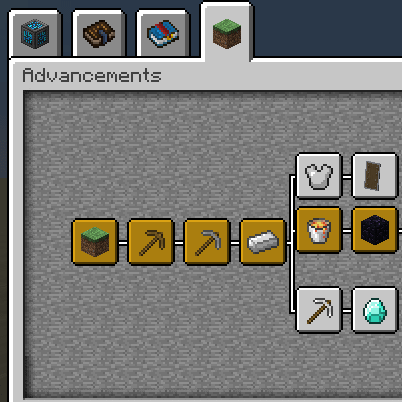
Better Advancements is a client-side-feeling interface upgrade for Minecraft's advancements screen. It is the successor to BetterAchievements, and it aims to improve the look and feel of advancements in a modded environment, where you can end up with a lot of advancement tabs.[1]
Its scope is cosmetic and quality of life. It doesn't add items, blocks or progression of its own, so it is for anyone who opens the advancements screen and wants it to be easier to read and browse.[1]
What it changes
- A screen-filling advancements UI instead of the small default window.[1]
- The option to change the color of advancement icons instead of the default gray, blue and orange.[1]
- A setting to stop the advancements background from fading on hover.[1]
- Description boxes that can grow slightly larger, so they are easier to read.[1]
- The tab title added to the title of the advancements UI.[1]
Version in this pack
The pack ships Better Advancements 0.4.3.21, the NeoForge build for Minecraft 1.21.1. It has been included since version 2.25 of the pack or earlier.[2]
Where it fits in progression
Because the mod is purely a UI and quality-of-life tweak, there is nothing to unlock or craft. You can open the advancements screen at any point in your run and get the improved layout straight away.[1]
Unverified The sources don't say whether this pack changes any of the mod's default settings, so check the in-game options before assuming the defaults for icon colors or hover fading.
How do you get started with Better Advancements?
1 part
Same as in the All the Mods 10 8.1 guide
Good news: Better Advancements doesn't ask you to craft anything or hunt for a special item. It's a cosmetic and quality-of-life mod that improves the advancements screen, so your first steps are just about opening that screen and seeing what's different.[1]
What changes when you open the advancements screen
- The advancements UI fills the whole screen instead of the tiny default window.[1]
- You can change the color of the advancement icons, instead of the default gray, blue and orange.[1]
- There's a setting to stop the advancements background from fading when you hover over it.[1]
- Description boxes can grow slightly larger, so they're easier to read.[1]
- The title of the current tab is added to the title of the advancements UI.[1]
That's the mod's whole scope. It tidies up how advancements look and read, and it doesn't add gameplay content of its own.[1]
Unverified I found no recipes, quests or in-game tooltips tied to Better Advancements in this pack, so there's no crafting order to follow and no recipe block for this section. This site does hold FTB Evolution 2's own recipes, read from the pack itself: look the item up in the item browser.
How does Better Advancements work?
1 part
Same as in the All the Mods 10 8.1 guide
Better Advancements has no machines, multiblocks, power, fluids or item automation to learn. According to its project page, its scope is cosmetic and Quality of Life: it improves the UI and UX of the advancements screen in a modded environment. So the mechanics here are all about how that screen looks and behaves.[1]
What the mod changes
- The advancements UI fills the screen instead of the tiny default window.[1]
- You can change the color of the advancement icons, instead of the default gray, blue and orange.[1]
- There is a setting to stop the advancements background from fading when you hover over it.[1]
- Description boxes can grow slightly larger, so they are easier to read.[1]
- The title of the current tab is added to the title of the advancements UI.[1]
Unverified Where the icon color and hover-fade settings live in this pack, and what their default values are, could not be confirmed. No config files, in-game descriptions or guidebook for this mod were available, and no recipes produce this mod's items.
What changed in Better Advancements between versions?
1 part
There isn't much version history for Better Advancements in this pack. FTB Evolution 2 1.1.0 ships version 0.6.0.76, using the NeoForge build for 26.1.2. The mod was first included in FTB Evolution 2 1.0.2 or earlier.[3]
0.6.0.76
- The mod's own changelog for this release lists one change: a fix for the Fabric Mixin on 26.1.[4]
- That fix is for the Fabric build, while the pack ships the NeoForge jar, so it is not a change to anything you see in the pack.[3][4]
Unverified The sources here include no pack changelog entries for Better Advancements, so what changed for this mod between pack releases is not shown. Check the pack's own changelog for that.
Sources
- Better Advancements project page (modrinth) · official mod data
- All the Mods 10 8.1 mod list · pack file
- FTB Evolution 2 1.1.0 mod list · pack file
- Better Advancements 0.6.0.76 changelog · changelog
Where this guide comes from
Written from what FTB Evolution 2 itself ships: its files and recipes, the in-game guidebooks and the mods' own pages. Every statement links to the source it came from, and the numbers are checked against the pack before publishing.
Guide last verified Oct 13, 2026.
Report wrong info
Version in each release
9 releases, first in 1.0.2
| FTB Evolution 2 | Version | Jar | Where it came from |
|---|---|---|---|
| 1.4.0 Oct 17, 2026 | 0.6.0.76 | BetterAdvancements-NeoForge-26.1.2-0.6.0.76.jar | From the published release |
| 1.3.2 Oct 16, 2026 | 0.6.0.76 | BetterAdvancements-NeoForge-26.1.2-0.6.0.76.jar | From the published release |
| 1.3.1 Oct 15, 2026 | 0.6.0.76 | BetterAdvancements-NeoForge-26.1.2-0.6.0.76.jar | From the published release |
| 1.3.0 Oct 14, 2026 | 0.6.0.76 | BetterAdvancements-NeoForge-26.1.2-0.6.0.76.jar | From the published release |
| 1.2.2 Oct 13, 2026 | 0.6.0.76 | BetterAdvancements-NeoForge-26.1.2-0.6.0.76.jar | From the published release |
| 1.2.1 Oct 12, 2026 | 0.6.0.76 | BetterAdvancements-NeoForge-26.1.2-0.6.0.76.jar | From the published release |
| 1.2.0 Oct 12, 2026 | 0.6.0.76 | BetterAdvancements-NeoForge-26.1.2-0.6.0.76.jar | From the published release |
| 1.1.0 Oct 10, 2026 | 0.6.0.76 | BetterAdvancements-NeoForge-26.1.2-0.6.0.76.jar | From the published release |
| 1.0.2 Oct 8, 2026 | 0.6.0.76 | BetterAdvancements-NeoForge-26.1.2-0.6.0.76.jar | From the published release |
"From pack files" means the list came from the pack's own files; "from the published release" means ForgeBase read the jars of the release itself.
Items and blocks
We can't match this mod to the pack's item list: it registers as betteradvancements, and the pack's recipe dump has nothing under that name. That means we found nothing, not that the mod adds nothing. Search the item browser
Comments and tips
Loading comments...