Better Advancements in FTB StoneBlock 4
FTB StoneBlock 4 1.23.0 ships version 0.4.3.21 · First seen in 1.0.0
Better Advancements is a mod in FTB StoneBlock 4 1.23.0, where it is version 0.4.3.21. Better Advancements tries to improve the UI and UX for the advancements system in minecraft 1.12+ in a modded environment (Summary from the mod's Modrinth page.)
Better Advancements guide for FTB StoneBlock 4
Last verified for FTB StoneBlock 4 v1.23.0 on Oct 7, 2026 · text last changed Oct 5, 2026
Also applies to:All the Mods 10 0.32 to 8.3All the Mods 11 0.1.0 to 0.12.0-betaAll the Mons 0.3.0-beta to 1.3.0FTB Evolution 2 1.0.2 to 1.4.0FTB Skies 2 1.0.1 to 1.24.0
- Sections
- 5
1 section is written for this pack; 4 are shared from another pack's guide.
Every recipe and number here was checked against FTB StoneBlock 4 1.23.0, read from the running game on Oct 13, 2026.
What is Better Advancements?
2 parts
Same as in the All the Mods 10 2.12 guide
Better Advancements is a small but handy upgrade to the vanilla advancements screen. It improves the look and usability of the advancements menu, and it's built for modded setups where the screen has a lot more to show than in vanilla.[1]
The mod is purely cosmetic and quality of life. It doesn't add blocks, machines or new things to unlock. It changes how you browse the advancements you already have, so there's nothing to craft or set up before you can use it.[1]
What it changes
- The advancements UI fills your whole screen instead of using the small vanilla window, so you can see much more of each tab at once.[1]
- You can change the colors of the advancement icons instead of the default gray, blue and orange.[1]
- A setting can stop the background from fading when you hover over an advancement.[1]
- Description boxes can grow a little larger, which makes them easier to read.[1]
- The name of the tab you're viewing is added to the title of the advancements screen.[1]
Who it's for
If you open the advancements screen to check your progress or see what's left to do, this mod makes that much easier. With so many mods adding their own advancement tabs, the bigger screen and clearer descriptions save you a lot of squinting and scrolling.[1]
How do you get started with Better Advancements?
1 part
Same as in the All the Mods 10 8.1 guide
Good news: Better Advancements doesn't ask you to craft anything or hunt for a special item. It's a cosmetic and quality-of-life mod that improves the advancements screen, so your first steps are just about opening that screen and seeing what's different.[1]
What changes when you open the advancements screen
- The advancements UI fills the whole screen instead of the tiny default window.[1]
- You can change the color of the advancement icons, instead of the default gray, blue and orange.[1]
- There's a setting to stop the advancements background from fading when you hover over it.[1]
- Description boxes can grow slightly larger, so they're easier to read.[1]
- The title of the current tab is added to the title of the advancements UI.[1]
That's the mod's whole scope. It tidies up how advancements look and read, and it doesn't add gameplay content of its own.[1]
Unverified I found no recipes, quests or in-game tooltips tied to Better Advancements in this pack, so there's no crafting order to follow and no recipe block for this section. This site does hold FTB StoneBlock 4's own recipes, read from the pack itself: look the item up in the item browser.
How does Better Advancements work?
4 parts
Same as in the All the Mods 10 2.12 guide
Better Advancements is a cosmetic and quality-of-life mod. It improves the look and usability of the vanilla advancements screen in a modded setting. It has no machines, multiblocks, power, fluids or automation. Its core mechanics are the redesigned advancements screen and the client-side settings that control how that screen looks and behaves.[1]
The screen-filling advancements UI
The biggest change is that the advancements screen now fills your whole screen, replacing the tiny vanilla window. Description boxes can grow slightly larger so they're easier to read. The title of the tab you're viewing is also added to the screen's title, so you always know which mod's or category's advancements you're looking at.[1]
The size of this screen is controlled by uiScaling. This pack leaves it at the mod default of 100, and the allowed range is 1 to 100.[3]
Criteria detail
Some advancements need several criteria before they complete. A good example is Adventuring Time, which needs a whole list of biomes. The criteriaDetail option controls whether the screen lists those criteria for partially completed advancements. The config describes three modes: Off gives vanilla behaviour, Spoiler reveals only the criteria you haven't obtained yet, and All shows both obtained and unobtained criteria.[3]
This pack changed this setting away from the mod's default and sets it to "Default". Separately, criteriaDetailRequiresShift is set to false in this pack.[3]
Unverified The pack's "Default" value for criteria detail is not one of the three modes the config describes (Off, Spoiler, All), so exactly which criteria it shows in-game could not be confirmed. The exact effect of the shift-requirement setting is also not documented in the available sources.
Advancement colors
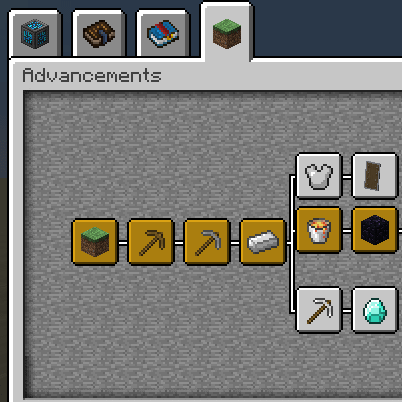
Better Advancements lets you change the colors of advancement icons instead of using vanilla's default gray, blue and orange. In this pack, the icons, connecting lines and titles use these colors:[1][3]
- defaultCompletedIconColor is #DBA213.[3]
- defaultCompletedTitleColor is #DBA213.[3]
- defaultCompletedLineColor is #FFFFFF.[3]
- defaultUncompletedIconColor is #FFFFFF.[3]
- defaultUncompletedLineColor is #FFFFFF.[3]
- defaultUncompletedTitleColor is #0489C1.[3]
Other display settings
The mod adds a setting to stop the advancements background from fading when you hover over something. In this pack, doAdvancementsBackgroundFade is set to true, so the background fade stays on.[1][3]
The remaining client settings are all set to false in this pack:[3]
- addInventoryButton[3]
- defaultDrawDirectLines[3]
- defaultHideLines[3]
- onlyUseAboveAdvancementTabs[3]
- orderTabsAlphabetically[3]
- showDebugCoordinates[3]
Which Better Advancements config options matter?
3 parts
Same as in the FTB Skies 2 1.22.0 guide
Better Advancements is cosmetic and quality-of-life only, so its config is small. All of it lives in the client file, starting with criteriaDetail. Here's what's worth knowing and how this pack sets it.[1][4]
The one value the pack changed
criteriaDetail controls the criteria listed for partially completed advancements, like the biomes needed for 'Adventuring Time'. The mod's default is to list which criteria you have already obtained. This pack changes it and sets it to "Default".[4]
The file's own comment describes these modes: Off is the vanilla default, Spoiler only reveals unobtained criteria, and All shows both obtained and unobtained criteria.[4]
Screen size and layout
- uiScaling is 100, the same as the mod default. The allowed range is 1 to 100, and the file warns that values below 50% might give odd results.[4]
- addInventoryButton is false in this pack.[4]
- orderTabsAlphabetically is false and onlyUseAboveAdvancementTabs is false.[4]
- showDebugCoordinates is false.[4]
Visual options
The mod lets you recolour advancement icons and stop the advancements background from fading on hover. In this pack doAdvancementsBackgroundFade is true, so the fade stays on. Set it to false if you want to stop the fade.[1][4]
The line options are defaultDrawDirectLines and defaultHideLines, and both are false here.[4]
- Completed icons and titles use #DBA213 (defaultCompletedIconColor and defaultCompletedTitleColor).[4]
- Completed lines are #FFFFFF (defaultCompletedLineColor).[4]
- Uncompleted icons and lines are #FFFFFF (defaultUncompletedIconColor and defaultUncompletedLineColor).[4]
- Uncompleted titles are #0489C1 (defaultUncompletedTitleColor).[4]
What changed in Better Advancements between versions?
1 part
FTB StoneBlock 4 1.21.0 ships Better Advancements 0.4.3.21, using the NeoForge build for Minecraft 1.21.1. The mod has been in the pack since FTB StoneBlock 4 1.0.0 or earlier, so you have had it from the start.[5]
Version 0.4.3.21
- The mod's changelog for this version lists one change: a config file is now created for Fabric if it doesn't exist. It is described as a Fabric fix, so it isn't aimed at the NeoForge build this pack uses.[5][6]
Unverified No pack changelog entries for Better Advancements were available, so any changes to the mod between StoneBlock 4 releases are unconfirmed.
Sources
- Better Advancements project page (modrinth) · official mod data
- All the Mods 10 2.12 mod list · pack file
- All the Mods 10 2.12 config: config/betteradvancements-client.toml · pack file
- FTB Skies 2 1.22.0 config: config/betteradvancements-client.toml · pack file
- FTB StoneBlock 4 1.21.0 mod list · pack file
- Better Advancements 0.4.3.21 changelog · changelog
Where this guide comes from
Written from what FTB StoneBlock 4 itself ships: its files and recipes, the in-game guidebooks and the mods' own pages. Every statement links to the source it came from, and the numbers are checked against the pack before publishing.
Guide last verified Oct 7, 2026.
Report wrong info
Version in each release
48 releases, first in 1.0.0
| FTB StoneBlock 4 | Version | Jar | Where it came from |
|---|---|---|---|
| 1.23.0 Oct 12, 2026 | 0.4.3.21 | BetterAdvancements-NeoForge-1.21.1-0.4.3.21.jar | From the published release |
| 1.22.0 Sep 22, 2026 | 0.4.3.21 | BetterAdvancements-NeoForge-1.21.1-0.4.3.21.jar | From the published release |
| 1.21.0 Sep 9, 2026 | 0.4.3.21 | BetterAdvancements-NeoForge-1.21.1-0.4.3.21.jar | From the published release |
| 1.20.1 Sep 1, 2026 | 0.4.3.21 | BetterAdvancements-NeoForge-1.21.1-0.4.3.21.jar | From the published release |
| 1.20.0 Aug 26, 2026 | 0.4.3.21 | BetterAdvancements-NeoForge-1.21.1-0.4.3.21.jar | From the published release |
| 1.19.1 Aug 12, 2026 | 0.4.3.21 | BetterAdvancements-NeoForge-1.21.1-0.4.3.21.jar | From the published release |
| 1.19.0 Aug 11, 2026 | 0.4.3.21 | BetterAdvancements-NeoForge-1.21.1-0.4.3.21.jar | From the published release |
| 1.18.0 Aug 9, 2026 | 0.4.3.21 | BetterAdvancements-NeoForge-1.21.1-0.4.3.21.jar | From the published release |
| 1.17.2 Jul 29, 2026 | 0.4.3.21 | BetterAdvancements-NeoForge-1.21.1-0.4.3.21.jar | From the published release |
| 1.17.1 Jul 28, 2026 | 0.4.3.21 | BetterAdvancements-NeoForge-1.21.1-0.4.3.21.jar | From the published release |
| 1.17.0 Jul 24, 2026 | 0.4.3.21 | BetterAdvancements-NeoForge-1.21.1-0.4.3.21.jar | From the published release |
| 1.16.0 Jul 2, 2026 | 0.4.3.21 | BetterAdvancements-NeoForge-1.21.1-0.4.3.21.jar | From the published release |
| 1.15.3 Jun 17, 2026 | 0.4.3.21 | BetterAdvancements-NeoForge-1.21.1-0.4.3.21.jar | From the published release |
| 1.15.2 Jun 16, 2026 | 0.4.3.21 | BetterAdvancements-NeoForge-1.21.1-0.4.3.21.jar | From the published release |
| 1.15.0 Jun 13, 2026 | 0.4.3.21 | BetterAdvancements-NeoForge-1.21.1-0.4.3.21.jar | From the published release |
| 1.14.2 Jun 3, 2026 | 0.4.3.21 | BetterAdvancements-NeoForge-1.21.1-0.4.3.21.jar | From the published release |
| 1.14.1 May 31, 2026 | 0.4.3.21 | BetterAdvancements-NeoForge-1.21.1-0.4.3.21.jar | From the published release |
| 1.14.0 May 27, 2026 | 0.4.3.21 | BetterAdvancements-NeoForge-1.21.1-0.4.3.21.jar | From the published release |
| 1.13.1 May 12, 2026 | 0.4.3.21 | BetterAdvancements-NeoForge-1.21.1-0.4.3.21.jar | From the published release |
| 1.13.0 May 12, 2026 | 0.4.3.21 | BetterAdvancements-NeoForge-1.21.1-0.4.3.21.jar | From the published release |
| 1.12.0 May 7, 2026 | 0.4.3.21 | BetterAdvancements-NeoForge-1.21.1-0.4.3.21.jar | From the published release |
| 1.11.1 Apr 24, 2026 | 0.4.3.21 | BetterAdvancements-NeoForge-1.21.1-0.4.3.21.jar | From the published release |
| 1.11.0 Apr 16, 2026 | 0.4.3.21 | BetterAdvancements-NeoForge-1.21.1-0.4.3.21.jar | From the published release |
| 1.10.0 Apr 8, 2026 | 0.4.3.21 | BetterAdvancements-NeoForge-1.21.1-0.4.3.21.jar | From the published release |
| 1.9.6 Apr 3, 2026 | 0.4.3.21 | BetterAdvancements-NeoForge-1.21.1-0.4.3.21.jar | From the published release |
| 1.9.5 Apr 1, 2026 | 0.4.3.21 | BetterAdvancements-NeoForge-1.21.1-0.4.3.21.jar | From the published release |
| 1.9.4 Mar 25, 2026 | 0.4.3.21 | BetterAdvancements-NeoForge-1.21.1-0.4.3.21.jar | From the published release |
| 1.9.3 Mar 23, 2026 | 0.4.3.21 | BetterAdvancements-NeoForge-1.21.1-0.4.3.21.jar | From the published release |
| 1.9.1 Mar 19, 2026 | 0.4.3.21 | BetterAdvancements-NeoForge-1.21.1-0.4.3.21.jar | From the published release |
| 1.9.0 Mar 17, 2026 | 0.4.3.21 | BetterAdvancements-NeoForge-1.21.1-0.4.3.21.jar | From the published release |
| 1.8.1 Mar 11, 2026 | 0.4.3.21 | BetterAdvancements-NeoForge-1.21.1-0.4.3.21.jar | From the published release |
| 1.8.0 Feb 10, 2026 | 0.4.3.21 | BetterAdvancements-NeoForge-1.21.1-0.4.3.21.jar | From the published release |
| 1.7.3 Feb 3, 2026 | 0.4.3.21 | BetterAdvancements-NeoForge-1.21.1-0.4.3.21.jar | From the published release |
| 1.7.2 Feb 3, 2026 | 0.4.3.21 | BetterAdvancements-NeoForge-1.21.1-0.4.3.21.jar | From the published release |
| 1.7.0 Jan 30, 2026 | 0.4.3.21 | BetterAdvancements-NeoForge-1.21.1-0.4.3.21.jar | From the published release |
| 1.6.0 Jan 7, 2026 | 0.4.3.21 | BetterAdvancements-NeoForge-1.21.1-0.4.3.21.jar | From the published release |
| 1.5.0 Dec 16, 2025 | 0.4.3.21 | BetterAdvancements-NeoForge-1.21.1-0.4.3.21.jar | From the published release |
| 1.4.0 Dec 9, 2025 | 0.4.3.21 | BetterAdvancements-NeoForge-1.21.1-0.4.3.21.jar | From the published release |
| 1.3.0 Dec 4, 2025 | 0.4.3.21 | BetterAdvancements-NeoForge-1.21.1-0.4.3.21.jar | From the published release |
| 1.2.1 Nov 26, 2025 | 0.4.3.21 | BetterAdvancements-NeoForge-1.21.1-0.4.3.21.jar | From the published release |
| 1.2.0 Nov 25, 2025 | 0.4.3.21 | BetterAdvancements-NeoForge-1.21.1-0.4.3.21.jar | From the published release |
| 1.1.2 Nov 18, 2025 | 0.4.3.21 | BetterAdvancements-NeoForge-1.21.1-0.4.3.21.jar | From the published release |
| 1.1.1 Nov 17, 2025 | 0.4.3.21 | BetterAdvancements-NeoForge-1.21.1-0.4.3.21.jar | From the published release |
| 1.0.8 Nov 6, 2025 | 0.4.3.21 | BetterAdvancements-NeoForge-1.21.1-0.4.3.21.jar | From the published release |
| 1.0.7 Nov 4, 2025 | 0.4.3.21 | BetterAdvancements-NeoForge-1.21.1-0.4.3.21.jar | From the published release |
| 1.0.3 Nov 1, 2025 | 0.4.3.21 | BetterAdvancements-NeoForge-1.21.1-0.4.3.21.jar | From the published release |
| 1.0.1 Oct 30, 2025 | 0.4.3.21 | BetterAdvancements-NeoForge-1.21.1-0.4.3.21.jar | From the published release |
| 1.0.0 Oct 29, 2025 | 0.4.3.21 | BetterAdvancements-NeoForge-1.21.1-0.4.3.21.jar | From the published release |
"From pack files" means the list came from the pack's own files; "from the published release" means ForgeBase read the jars of the release itself.
Items and blocks
We can't match this mod to the pack's item list: it registers as betteradvancements, and the pack's recipe dump has nothing under that name. That means we found nothing, not that the mod adds nothing. Search the item browser
Config options (how FTB StoneBlock 4 sets them)
16 settings shipped in the pack's config files; 1 differ from the mod's documented default.
Show settings
| Setting | FTB StoneBlock 4 value | Mod default |
|---|---|---|
criteriaDetail changed by FTB StoneBlock 4Lists the criteria for partially completed advancements, e.g. the biomes required for 'Adventuring Time' Off: Vanilla default Spoiler: Only reveal unobtained criteria All: Show both obtained and unobtained criteria config/betteradvancements-client.toml | Default | List which criteria you have already obtained |
addInventoryButton config/betteradvancements-client.toml | false | not documented |
criteriaDetailRequiresShift config/betteradvancements-client.toml | false | not documented |
defaultCompletedIconColor config/betteradvancements-client.toml | #DBA213 | not documented |
defaultCompletedLineColor config/betteradvancements-client.toml | #FFFFFF | not documented |
defaultCompletedTitleColor config/betteradvancements-client.toml | #DBA213 | not documented |
Comments and tips
Loading comments...