Crafting on a Stick in All the Mods 10: To the Sky
All the Mods 10: To the Sky 2.1.0 ships version 1.21.0.6 · First seen in 1.0
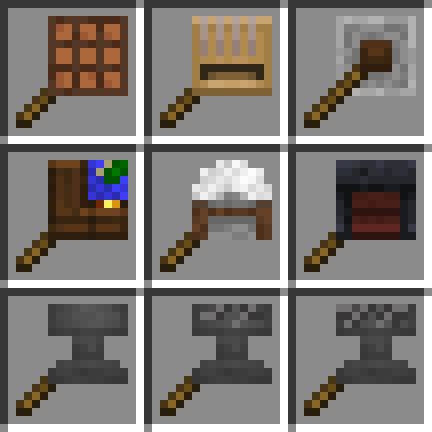
Crafting on a Stick is a mod in All the Mods 10: To the Sky 2.1.0, where it is version 1.21.0.6. Adds multiple crafting station on a stick such as crafting table on a stick (Summary from the mod's Modrinth page.)
Crafting on a Stick guide for All the Mods 10: To the Sky
Last verified for All the Mods 10: To the Sky v2.1.0 on Oct 17, 2026 · text last changed Oct 17, 2026
Also applies to:All the Mods 10 0.32 to 1.5
- Sections
- 6
- Recipes shown
- 9
- Items named
- 9
- Quests covered
- 11
5 sections are written for this pack; 1 is shared from another pack's guide.
Every recipe and number here was checked against All the Mods 10: To the Sky 2.1.0, read from the running game on Oct 15, 2026.
What is Crafting on a Stick?
3 parts
Crafting on a Stick lets you use crafting stations straight from your hand, so you don't have to place a crafting table on the ground first. It's a small quality-of-life mod, and it's handy when you're out exploring or setting up a base and don't want to stop to build a station.[1]
What it adds
The mod adds several workbenches on a stick. Use any of them in hand to open that station's interface.[1]
- Crafting Table[1]
- Anvil[1]
- Loom[1]
- Grindstone[1]
- Cartography Table[1]
- Stonecutter[1]
- Smithing Table[1]
Curios support
The mod is compatible with Curios. You can put your favorite workbench on a stick in the designated curios slot and press the keybind to open it. The mod's default key is V.[1]
In this pack
The pack includes Crafting on a Stick version 1.21.0.6.[2]
Unverified The sources don't show where this mod fits in the pack's progression. It is not on the ATM Star quest path, and no quests in the pack involve it. Whether the pack changes any of its recipes or settings is also unconfirmed.
How do you get started with Crafting on a Stick?
4 parts
Crafting on a Stick lets you use crafting stations without placing them on the ground. You hold the item and use it in hand to open the station.[1]
Start with the crafting table
A good first pick is the Crafting Table. You can craft anywhere without placing a table and picking it back up. Here is the exact in-pack recipe:[1][3]
Crafting Shaped
| Empty slot | |
| Empty slot |
Recipe id: crafting_on_a_stick:crafting_table
Then add the other stations
The mod adds more stations on a stick beyond the crafting table. Each has its own shaped recipe in this pack, so you can make only the ones you actually use.[1][3]
The Smithing Table gives you a smithing table in your hand:[1][3]
Crafting Shaped
| Empty slot | |
| Empty slot |
Recipe id: crafting_on_a_stick:smithing_table
The Stonecutter does the same for stonecutting:[1][3]
Crafting Shaped
| Empty slot | |
| Empty slot |
Recipe id: crafting_on_a_stick:stonecutter
The Grindstone, Loom and Cartography Table work the same way:[1][3]
Crafting Shaped
| Empty slot | |
| Empty slot |
Recipe id: crafting_on_a_stick:grindstone
Crafting Shaped
| Empty slot | |
| Empty slot |
Recipe id: crafting_on_a_stick:cartography_table
The anvil, in all its states
The anvil has a separate recipe for each damage state in this pack: Anvil, Chipped Anvil and Damaged Anvil.[3]
Crafting Shaped
| Empty slot | |
| Empty slot |
Recipe id: crafting_on_a_stick:chipped_anvil
Crafting Shaped
| Empty slot | |
| Empty slot |
Recipe id: crafting_on_a_stick:damaged_anvil
Curios slot
How does Crafting on a Stick work?
3 parts
Same as in the All the Mods 10 1.5 guide
This mod is simple, and that's the point. It has no machines, multiblocks, power or fluid systems. Each item is a vanilla crafting station on a stick, so you can use the station without placing a block in the world.[1]
Using a station on a stick
Hold the item and use it to open that station's interface. The mod adds seven stations: Crafting Table, Anvil, Loom, Grindstone, Cartography Table, Stonecutter and Smithing Table.[1][4]
The anvil also comes in worn versions, Chipped Anvil and Damaged Anvil. This pack has a recipe for each of them, so you can carry an anvil at any damage level.[4]
Crafting them
Each stick item is made by combining the vanilla version of that station with a stick. These recipes are shaped crafting recipes. Every recipe in this pack is shown below.[1][4]
Crafting Shaped
| Empty slot | |
| Empty slot |
Recipe id: crafting_on_a_stick:crafting_table
Crafting Shaped
| Empty slot | |
| Empty slot |
Recipe id: crafting_on_a_stick:grindstone
Crafting Shaped
| Empty slot | |
| Empty slot |
Recipe id: crafting_on_a_stick:cartography_table
Crafting Shaped
| Empty slot | |
| Empty slot |
Recipe id: crafting_on_a_stick:stonecutter
Crafting Shaped
| Empty slot | |
| Empty slot |
Recipe id: crafting_on_a_stick:smithing_table
Crafting Shaped
| Empty slot | |
| Empty slot |
Recipe id: crafting_on_a_stick:chipped_anvil
Crafting Shaped
| Empty slot | |
| Empty slot |
Recipe id: crafting_on_a_stick:damaged_anvil
Curios support
The mod works with Curios. Put your favorite station on a stick in the designated curios slot and press the keybind to open it. The default key is V.[1]
Unverified Details beyond this aren't covered by the available sources. These include whether the pack has config options for the mod, and any extra behavior of the stations, such as how the anvil on a stick handles damage. The mod has no config files in this pack, and no in-jar guidebook or tooltips were available to check.
How do you progress through Crafting on a Stick?
3 parts
Crafting on a Stick doesn't have a tier ladder in this pack. Every item in the recipe dump has its own shaped crafting recipe from the mod, and each one takes the matching vanilla station plus a stick, not another Crafting on a Stick item. So you can craft whichever station-on-a-stick you want without making another one first.[3]
Unverified No quests in this pack involve Crafting on a Stick, and the mod is not on the ATM Star quest path. No in-pack guidebook was found either, so there is no official quest-driven progression to follow.
The basics
The simplest one to start with is the Crafting Table. It's a good first pick because you'll use it constantly.[3]
Crafting Shaped
| Empty slot | |
| Empty slot |
Recipe id: crafting_on_a_stick:crafting_table
Utility stations
The mod also adds portable versions of several other utility stations: the Stonecutter, Smithing Table, Loom, Cartography Table and Grindstone. You'll find each one's recipe below.[3]
Crafting Shaped
| Empty slot | |
| Empty slot |
Recipe id: crafting_on_a_stick:stonecutter
Crafting Shaped
| Empty slot | |
| Empty slot |
Recipe id: crafting_on_a_stick:smithing_table
Crafting Shaped
| Empty slot | |
| Empty slot |
Recipe id: crafting_on_a_stick:cartography_table
Crafting Shaped
| Empty slot | |
| Empty slot |
Recipe id: crafting_on_a_stick:grindstone
Anvils
Anvils come in all three damage states: the Anvil, the Chipped Anvil and the Damaged Anvil. Each has its own recipe block below, so you can make any of them directly.[3]
Crafting Shaped
| Empty slot | |
| Empty slot |
Recipe id: crafting_on_a_stick:chipped_anvil
Crafting Shaped
| Empty slot | |
| Empty slot |
Recipe id: crafting_on_a_stick:damaged_anvil
Which All the Mods 10: To the Sky quests use Crafting on a Stick?
2 parts
Crafting on a Stick shows up in one quest chapter in the pack: "Tips and Tricks", a 12-quest chapter of short tips about useful mods and items.[5]
The quest: Crafting... on a Stick!
The mod has its own quest, "Crafting... on a Stick!" quest, with the subtitle "Less Placing, more Crafting". It is an item task. The quest text explains that the mod adds portable versions of some of your favorite crafting stations, with a portable Crafting Table and a portable Smithing Table as the examples. The book calls it a must have in the early game.[5]
Where it sits in the chapter
The chapter's closing quest, a quest in "Tips and Tricks" ("Complete all the tips!"), is a checkmark quest that comes after five tips: "Infinite Water" quest, "Personal Shrinking Device" quest, "Simple Magnets" quest, "Charging Gadgets" quest and "Iron Jetpacks" quest. The Crafting on a Stick quest is not one of those five.[5]
The other tips in the chapter cover Functional Storage ("Functional Storage" quest), Building Gadgets ("Building Gadgets" quest) and the Black Trader Carpet (a quest in "Tips and Tricks"). There is also an info page, a quest in "Tips and Tricks", whose text says it collects useful items and info to help you on your journey.[5]
What changed in Crafting on a Stick between versions?
1 part
All the Mods 10: To the Sky 2.0.4 ships Crafting on a Stick 1.21.0.6. The mod has been in the pack since version 1.0 or earlier, so you've had it from the start. Here's what changed in the mod's own releases up to the version you're running.[2]
Mod changelog highlights
- 1.21.0.2: You can now keep items in the crafting grid, and there's a config option to turn that off if you don't want it.[6]
- 1.21.0.2: Fixed a crash that made the mod incompatible with other mods.[6]
- 1.21.0.4: The wheel popup animation was changed to reduce flashing.[7]
- 1.21.0.4: Added an API for custom wheel items.[7]
- 1.21.0.6: Fixed an item deletion bug. This is the version in the pack right now.[2][8]
Sources
- Crafting on a Stick project page (modrinth) · official mod data
- All the Mods 10: To the Sky 2.0.4 mod list · pack file
- All the Mods 10: To the Sky 2.0.4 recipe dump: recipes making Crafting on a Stick items · pack recipe dump
- All the Mods 10 1.5 recipe dump: recipes making Crafting on a Stick items · pack recipe dump
- All the Mods 10: To the Sky 2.0.4 quests: "Tips and Tricks" · pack file
- Crafting on a Stick 1.21.0.2 changelog · changelog
- Crafting on a Stick 1.21.0.4 changelog · changelog
- Crafting on a Stick 1.21.0.6 changelog · changelog
Where this guide comes from
Written from what All the Mods 10: To the Sky itself ships: its files and recipes, the in-game guidebooks and the mods' own pages. Every statement links to the source it came from, and the numbers are checked against the pack before publishing.
Guide last verified Oct 17, 2026.
Report wrong info
Version in each release
25 releases, first in 1.0
| All the Mods 10: To the Sky | Version | Jar | Where it came from |
|---|---|---|---|
| 2.1.0 Oct 15, 2026 | 1.21.0.6 | crafting_on_a_stick-1.21.0.6.jar | From the published release |
| 2.0.7 Oct 5, 2026 | 1.21.0.6 | crafting_on_a_stick-1.21.0.6.jar | From the published release |
| 2.0.6 Sep 21, 2026 | 1.21.0.6 | crafting_on_a_stick-1.21.0.6.jar | From the published release |
| 2.0.5 Sep 21, 2026 | 1.21.0.6 | crafting_on_a_stick-1.21.0.6.jar | From the published release |
| 2.0.4 Sep 11, 2026 | 1.21.0.6 | crafting_on_a_stick-1.21.0.6.jar | From the published release |
| 2.0.3 Sep 9, 2026 | 1.21.0.6 | crafting_on_a_stick-1.21.0.6.jar | From the published release |
| 2.0.2 Apr 1, 2026 | 1.21.0.4 | crafting_on_a_stick-1.21.0.4.jar | From the published release |
| 2.0.1 Mar 27, 2026 | 1.21.0.4 | crafting_on_a_stick-1.21.0.4.jar | From the published release |
| 2.0.0 Feb 24, 2026 | 1.21.0.4 | crafting_on_a_stick-1.21.0.4.jar | From the published release |
| 1.9.1 Feb 5, 2026 | 1.21.0.4 | crafting_on_a_stick-1.21.0.4.jar | From the published release |
| 1.9 Feb 4, 2026 | 1.21.0.4 | crafting_on_a_stick-1.21.0.4.jar | From the published release |
| 1.8 Dec 20, 2025 | 1.21.0.2 | crafting_on_a_stick-1.21.0.2.jar | From the published release |
| 1.7 Nov 28, 2025 | 1.21.0.2 | crafting_on_a_stick-1.21.0.2.jar | From the published release |
| 1.6.1 Oct 23, 2025 | 1.21.0.2 | crafting_on_a_stick-1.21.0.2.jar | From the published release |
| 1.6 Oct 17, 2025 | 1.21.0.2 | crafting_on_a_stick-1.21.0.2.jar | From the published release |
| 1.5.1b Oct 2, 2025 | 1.21.0.2 | crafting_on_a_stick-1.21.0.2.jar | From the published release |
| 1.5 Sep 26, 2025 | 1.21.0.2 | crafting_on_a_stick-1.21.0.2.jar | From the published release |
| 1.4 Sep 11, 2025 | 1.21.0.2 | crafting_on_a_stick-1.21.0.2.jar | From the published release |
| 1.3.1 Sep 3, 2025 | 1.21.0.2 | crafting_on_a_stick-1.21.0.2.jar | From the published release |
| 1.2.1 Aug 28, 2025 | 1.21.0.2 | crafting_on_a_stick-1.21.0.2.jar | From the published release |
| 1.2 Aug 28, 2025 | 1.21.0.2 | crafting_on_a_stick-1.21.0.2.jar | From the published release |
| 1.1.2 Aug 22, 2025 | 1.21.0.2 | crafting_on_a_stick-1.21.0.2.jar | From the published release |
| 1.1.1 Aug 21, 2025 | 1.21.0.2 | crafting_on_a_stick-1.21.0.2.jar | From the published release |
| 1.0.2 Aug 15, 2025 | 1.21.0.2 | crafting_on_a_stick-1.21.0.2.jar | From the published release |
| 1.0 Aug 14, 2025 | 1.21.0.2 | crafting_on_a_stick-1.21.0.2.jar | From the published release |
"From pack files" means the list came from the pack's own files; "from the published release" means ForgeBase read the jars of the release itself.
Comments and tips
Loading comments...