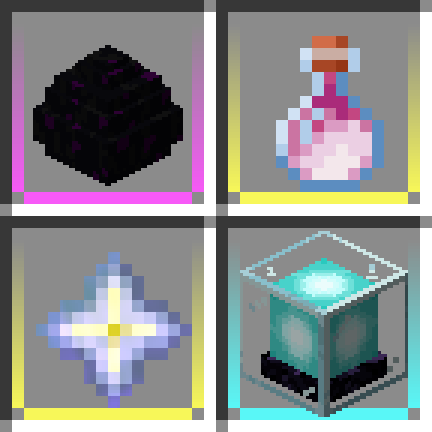
Item Borders in FTB Evolution 2
FTB Evolution 2 1.4.0 ships version 1.3.1 · First seen in 1.0.2
Item Borders is a mod in FTB Evolution 2 1.4.0, where it is version 1.3.1. Add colored borders to inventory slots to make your rare items stand out! (Summary from the mod's Modrinth page.)
Item Borders guide for FTB Evolution 2
Last verified for FTB Evolution 2 v1.4.0 on Oct 13, 2026 · text last changed Oct 13, 2026
- Sections
- 4
Every recipe and number here was checked against FTB Evolution 2 1.4.0, read from the running game on Oct 17, 2026.
What is Item Borders?
1 part
Item Borders adds colored borders to inventory slots, so your rare items stand out at a glance. If you have ever lost a good drop in a pile of modded loot, this is the fix.[1]
The pack ships Item Borders 1.3.1. The mod is fully client-side. It needs Iceberg, and versions 1.2 and newer also need Prism.[1][2]
What you can tweak
- By default, common items get no border. A configuration option turns that on.[1]
- Borders can optionally be disabled on the hotbar too.[1]
- Custom colors from the Loot Beams mod can be synchronized as item borders with an option.[1]
- Automatic borders can be switched off completely. You can then set colors by hand for items or tags in the client.options.manual_borders section, with a color name or hex code on the left and an item path, a tag or a list of them on the right.[1]
The mod should work with modded items, and even with modded item rarities, so you do not need to set anything up per mod.[1]
How do you get started with Item Borders?
1 part
Item Borders (Item Borders) is a small quality-of-life mod. It adds colored borders to inventory slots so your rare items stand out. There is nothing to build to get started, and the mod is fully client-side.[1]
What the mod does out of the box
These are the mod's defaults and options as its project page describes them. They are not confirmed as this pack's own values.[1]
- Borders are not displayed for common items by default. A configuration option turns them on.[1]
- Borders can optionally be disabled on the hotbar as well.[1]
- Custom colors from the Loot Beams mod can be synchronized as item borders with an option.[1]
- Automatic borders can be disabled completely. You can then give items or tags your own colors in the [client.options.manual_borders] section, using a color name or hex code on the left and an item path, a tag or a list of them on the right.[1]
- For example, the project page shows green = "#forge:ores" to color everything in the ores tag green, and FCC040 = ["minecraft:stick", "torch"] to give sticks and torches a hex color.[1]
The project page says the mod should be fully compatible with modded items, and even modded item rarities.[1]
Unverified The sources here show no recipes, quests or config files for this mod in this pack, so I can't tell you whether the pack changes any border settings from the mod's defaults. If you want to adjust your borders, check the mod's client configuration in your own instance.
How does Item Borders work?
3 parts
Item Borders is a different kind of mod from the machine mods you may be used to. It adds colored borders to inventory slots so your rare items stand out. The sources describe no machines, multiblocks, power, fluids or item automation for it, so this section covers how the borders behave and how they can be tuned.[1]
Client-side only
The mod is fully client-side. The borders are something you see on your own screen, and they don't change the items or how a server handles them. It requires Iceberg, and newer versions also need Prism.[1]
It is meant to work with modded items too, including modded item rarities.[1]
What gets a border
Borders are automatic by default, and by default they are not shown for common items. An option lets you turn borders on for common items as well.[1]
- Borders can optionally be disabled on the hotbar.[1]
- Custom colors from the Loot Beams mod can be synchronized as item borders with an option.[1]
- Automatic borders can be disabled completely.[1]
Manual border colors
If you want full control, you can specify colors yourself for items or tags. Each entry sits under the manual borders section of the client options and pairs a color (a color name or a hex code) with either a list of item paths or tags, or a single item path or tag.[1]
The project page gives this example: the hex color FCC040 for a list holding a stick and a torch, green for the ores tag, and red for oak planks.[1]
Unverified Which of these options the pack enables, and any manual border colors it sets, are not shown in the sources here. Check the mod's client config in the pack for the actual values.
What changed in Item Borders between versions?
1 part
There isn't much history to cover for Item Borders in this pack. FTB Evolution 2 1.1.0 ships Item Borders 1.3.1, and the mod has been in the pack since FTB Evolution 2 1.0.2 or earlier.[2]
Item Borders 1.3.1
The mod's own changelog for 1.3.1 has a single entry: the initial 26.1 port. That is the version you get in the pack's 1.1.0 release.[2][3]
Unverified The sources here include no pack changelog entries for Item Borders, so changes to the mod between pack releases are not shown. Check the pack's own changelogs for anything more.
Sources
- Item Borders project page (modrinth) · official mod data
- FTB Evolution 2 1.1.0 mod list · pack file
- Item Borders 1.3.1 changelog · changelog
Where this guide comes from
Written from what FTB Evolution 2 itself ships: its files and recipes, the in-game guidebooks and the mods' own pages. Every statement links to the source it came from, and the numbers are checked against the pack before publishing.
Guide last verified Oct 13, 2026.
Report wrong info
Version in each release
9 releases, first in 1.0.2
| FTB Evolution 2 | Version | Jar | Where it came from |
|---|---|---|---|
| 1.4.0 Oct 17, 2026 | 1.3.1 | ItemBorders-26.1.2-neoforge-1.3.1.jar | From the published release |
| 1.3.2 Oct 16, 2026 | 1.3.1 | ItemBorders-26.1.2-neoforge-1.3.1.jar | From the published release |
| 1.3.1 Oct 15, 2026 | 1.3.1 | ItemBorders-26.1.2-neoforge-1.3.1.jar | From the published release |
| 1.3.0 Oct 14, 2026 | 1.3.1 | ItemBorders-26.1.2-neoforge-1.3.1.jar | From the published release |
| 1.2.2 Oct 13, 2026 | 1.3.1 | ItemBorders-26.1.2-neoforge-1.3.1.jar | From the published release |
| 1.2.1 Oct 12, 2026 | 1.3.1 | ItemBorders-26.1.2-neoforge-1.3.1.jar | From the published release |
| 1.2.0 Oct 12, 2026 | 1.3.1 | ItemBorders-26.1.2-neoforge-1.3.1.jar | From the published release |
| 1.1.0 Oct 10, 2026 | 1.3.1 | ItemBorders-26.1.2-neoforge-1.3.1.jar | From the published release |
| 1.0.2 Oct 8, 2026 | 1.3.1 | ItemBorders-26.1.2-neoforge-1.3.1.jar | From the published release |
"From pack files" means the list came from the pack's own files; "from the published release" means ForgeBase read the jars of the release itself.
Items and blocks
We can't match this mod to the pack's item list: it registers as itemborders, and the pack's recipe dump has nothing under that name. That means we found nothing, not that the mod adds nothing. Search the item browser
Comments and tips
Loading comments...