Sky GUIs in All the Mods 10: To the Sky
All the Mods 10: To the Sky 2.1.0 ships version 21.1.10 · First seen in 1.0
Sky GUIs is a mod in All the Mods 10: To the Sky 2.1.0, where it is version 21.1.10. An addon for Skyblock Builder which provides GUIs to easily modify and view teams (Summary from the mod's Modrinth page.)
Sky GUIs guide for All the Mods 10: To the Sky
Last verified for All the Mods 10: To the Sky v2.1.0 on Oct 11, 2026 · text last changed Oct 11, 2026
Also applies to:Project Infinity 0.1 0.0.45.4 to 0.0.51.4-hotfix-2
- Sections
- 4
Every recipe and number here was checked against All the Mods 10: To the Sky 2.1.0, read from the running game on Oct 15, 2026.
What is Sky GUIs?
2 parts
Sky GUIs is an addon for the skyblock mod Skyblock Builder. It adds a lot of GUIs that simplify using Skyblock Builder, so you can click through screens instead of working everything out on your own.[1]
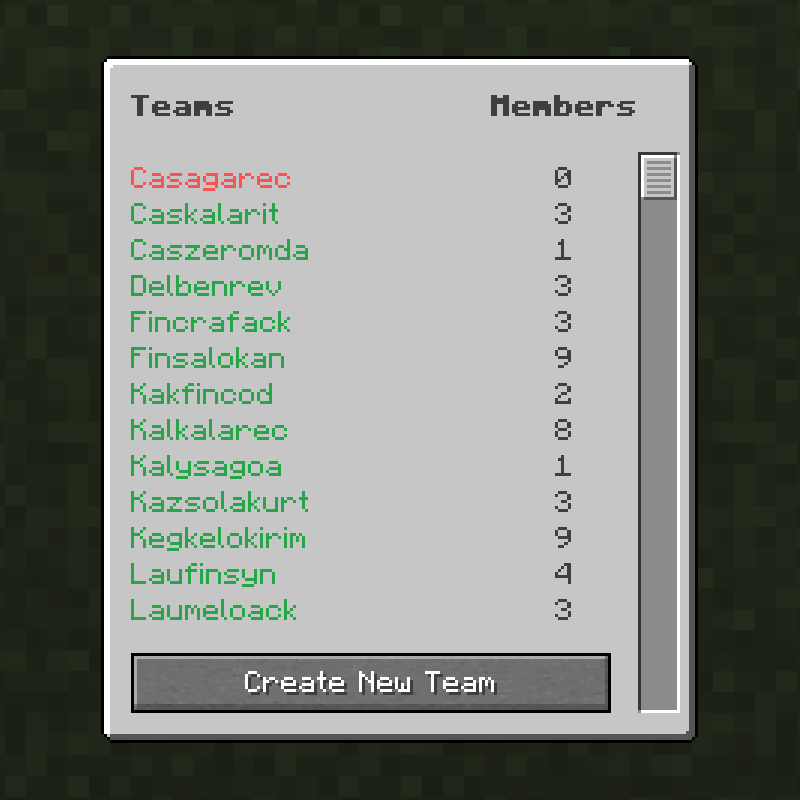
There are screens for creating a team, managing your own team and viewing all teams, plus a bit more.[1]
Opening the menu
The base screen opens with the L key by default. In newer versions of the mod the default is the period key instead. From the base screen you can navigate to all the other screens.[1]
In this pack
The pack ships Sky GUIs 21.1.10.[2]
How do you get started with Sky GUIs?
1 part
Sky GUIs doesn't have a crafting chain to work through. It's an addon for the skyblock mod Skyblock Builder, and it adds screens that make Skyblock Builder easier to use. There are screens for creating a team, managing your own team, and viewing all teams, plus a few more.[1]
The sources I have list no recipes for this mod's items, so there's no recipe block here. They also list no quests that involve it, so I won't invent a first-items order.[1]
Your first steps
- Press the default key to open the base screen. The mod's page gives L, and says newer versions use the period key instead.[1]
- From the base screen, you can navigate to the other screens. That's your hub for creating a team, managing your own team, and viewing all teams.[1]
Unverified The mod's page says L is the default key and that newer versions use the period key. Which of the two applies in this pack's version isn't confirmed by the sources, so try both if one doesn't open the screen.
How does Sky GUIs work?
2 parts
Sky GUIs doesn't add machines, multiblocks, power, fluids or item automation. It's an addon for the skyblock mod Skyblock Builder, and all it does is give you screens for working with teams, so the "mechanics" here are about how you use those screens.[1]
What the screens cover
The mod adds GUIs that simplify the use of Skyblock Builder. There are screens for creating a team, managing your own team and viewing all teams, plus a few more.[1]
Opening the base screen
Everything starts from the base screen. By default you open it with the L key, or with the period key in newer versions. From there you can navigate to all the other screens.[1]
Unverified Whether this pack's version of the mod uses L or the period key as the default for the base screen isn't confirmed by the available sources. Check your Controls menu in-game to see which key is bound.
Unverified The pack ships no config files for this mod and nothing in the pack crafts its items. The sources don't describe any further mechanics, such as team size limits or permissions inside the screens, so they aren't covered here.
What changed in Sky GUIs between versions?
All the Mods 10: To the Sky 2.0.4 ships Sky GUIs 21.1.10, and the mod has been in the pack since 1.0 or earlier. Here are the changes from the mod's own changelogs for the versions I have notes on, newest first.[2]
- 21.1.10: Fixed team creation failing when a palette was selected on another template.[3]
- 21.1.8: Added palette selection to the create team screen.[4]
- 21.1.7: Fixed the tooltip not updating when a template has no description, and fixed empty messages showing up when teleporting.[5]
- 21.1.6: Added "sky" as a command alias for "skyblock", so you can type the shorter one.[6]
- 21.1.5: Fixed a crash when opening the in-game config.[7]
Since the pack is on 21.1.10, you already have all of these changes, including the palette selection and the team creation fix.[2][3][4]
Sources
- Sky GUIs project page (modrinth) · official mod data
- All the Mods 10: To the Sky 2.0.4 mod list · pack file
- Sky GUIs 21.1.10 changelog · changelog
- Sky GUIs 21.1.8 changelog · changelog
- Sky GUIs 21.1.7 changelog · changelog
- Sky GUIs 21.1.6 changelog · changelog
- Sky GUIs 21.1.5 changelog · changelog
Where this guide comes from
Written from what All the Mods 10: To the Sky itself ships: its files and recipes, the in-game guidebooks and the mods' own pages. Every statement links to the source it came from, and the numbers are checked against the pack before publishing.
Guide last verified Oct 11, 2026.
Report wrong info
Version in each release
25 releases, first in 1.0
| All the Mods 10: To the Sky | Version | Jar | Where it came from |
|---|---|---|---|
| 2.1.0 Oct 15, 2026 | 21.1.10 | SkyGUIs-21.1.10.jar | From the published release |
| 2.0.7 Oct 5, 2026 | 21.1.10 | SkyGUIs-21.1.10.jar | From the published release |
| 2.0.6 Sep 21, 2026 | 21.1.10 | SkyGUIs-21.1.10.jar | From the published release |
| 2.0.5 Sep 21, 2026 | 21.1.10 | SkyGUIs-21.1.10.jar | From the published release |
| 2.0.4 Sep 11, 2026 | 21.1.10 | SkyGUIs-21.1.10.jar | From the published release |
| 2.0.3 Sep 9, 2026 | 21.1.10 | SkyGUIs-21.1.10.jar | From the published release |
| 2.0.2 Apr 1, 2026 | 21.1.8 | SkyGUIs-21.1.8.jar | From the published release |
| 2.0.1 Mar 27, 2026 | 21.1.8 | SkyGUIs-21.1.8.jar | From the published release |
| 2.0.0 Feb 24, 2026 | 21.1.8 | SkyGUIs-21.1.8.jar | From the published release |
| 1.9.1 Feb 5, 2026 | 21.1.8 | SkyGUIs-21.1.8.jar | From the published release |
| 1.9 Feb 4, 2026 | 21.1.8 | SkyGUIs-21.1.8.jar | From the published release |
| 1.8 Dec 20, 2025 | 21.1.7 | SkyGUIs-21.1.7.jar | From the published release |
| 1.7 Nov 28, 2025 | 21.1.7 | SkyGUIs-21.1.7.jar | From the published release |
| 1.6.1 Oct 23, 2025 | 21.1.6 | SkyGUIs-21.1.6.jar | From the published release |
| 1.6 Oct 17, 2025 | 21.1.6 | SkyGUIs-21.1.6.jar | From the published release |
| 1.5.1b Oct 2, 2025 | 21.1.6 | SkyGUIs-21.1.6.jar | From the published release |
| 1.5 Sep 26, 2025 | 21.1.6 | SkyGUIs-21.1.6.jar | From the published release |
| 1.4 Sep 11, 2025 | 21.1.6 | SkyGUIs-21.1.6.jar | From the published release |
| 1.3.1 Sep 3, 2025 | 21.1.6 | SkyGUIs-21.1.6.jar | From the published release |
| 1.2.1 Aug 28, 2025 | 21.1.5 | SkyGUIs-21.1.5.jar | From the published release |
| 1.2 Aug 28, 2025 | 21.1.5 | SkyGUIs-21.1.5.jar | From the published release |
| 1.1.2 Aug 22, 2025 | 21.1.5 | SkyGUIs-21.1.5.jar | From the published release |
| 1.1.1 Aug 21, 2025 | 21.1.5 | SkyGUIs-21.1.5.jar | From the published release |
| 1.0.2 Aug 15, 2025 | 21.1.5 | SkyGUIs-21.1.5.jar | From the published release |
| 1.0 Aug 14, 2025 | 21.1.5 | SkyGUIs-21.1.5.jar | From the published release |
"From pack files" means the list came from the pack's own files; "from the published release" means ForgeBase read the jars of the release itself.
Items and blocks
We can't match this mod to the pack's item list: it registers as skyguis, and the pack's recipe dump has nothing under that name. That means we found nothing, not that the mod adds nothing. Search the item browser
Comments and tips
Loading comments...